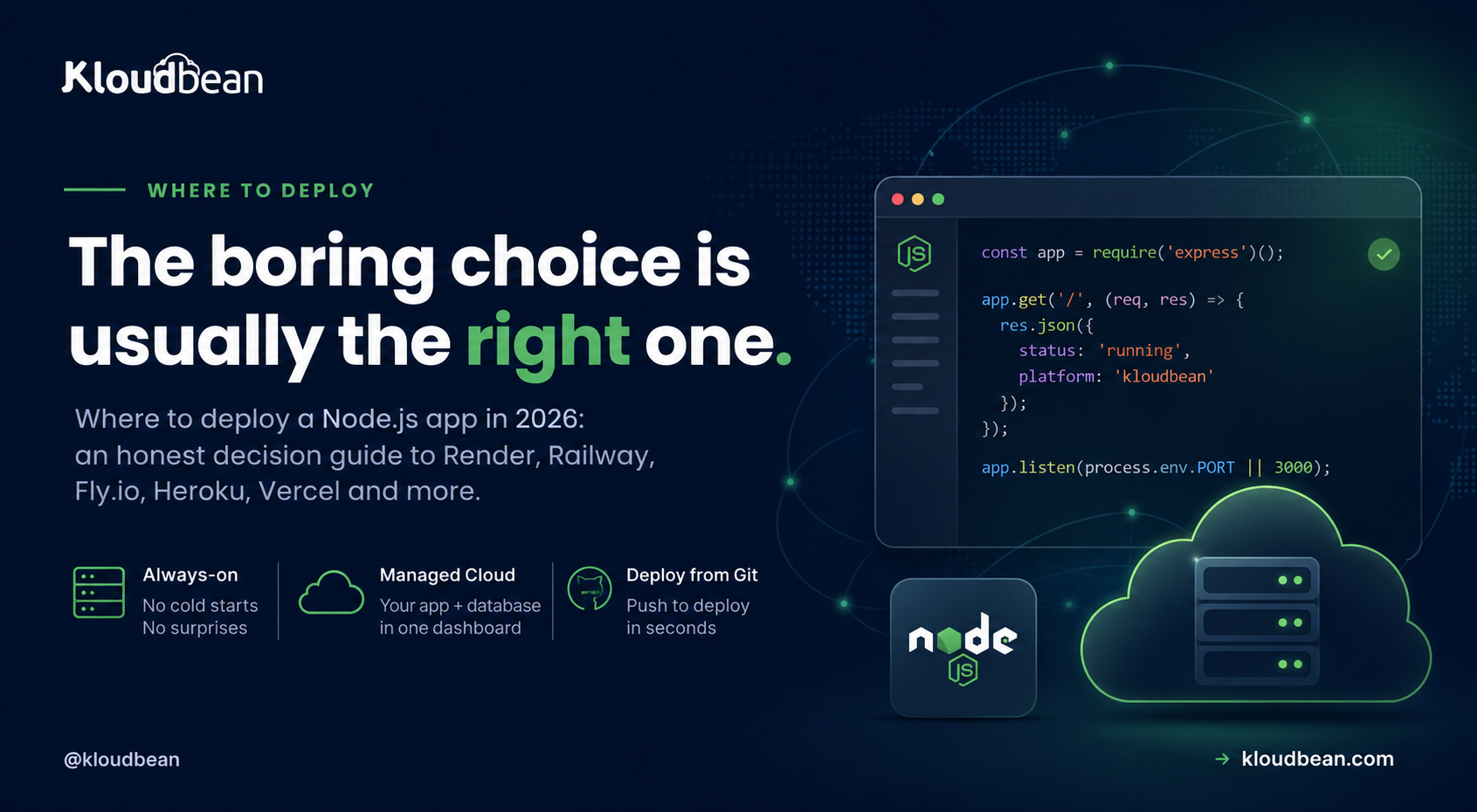
A weekend project and a payments API both “run on Node,” but they want completely different homes. That is why “which host is best” has no answer, and why comparing brands first gets people into trouble. There are only a handful of genuinely different ways to run Node.js, each optimised for a different shape of application. Identify your shape and the platform question mostly answers itself.
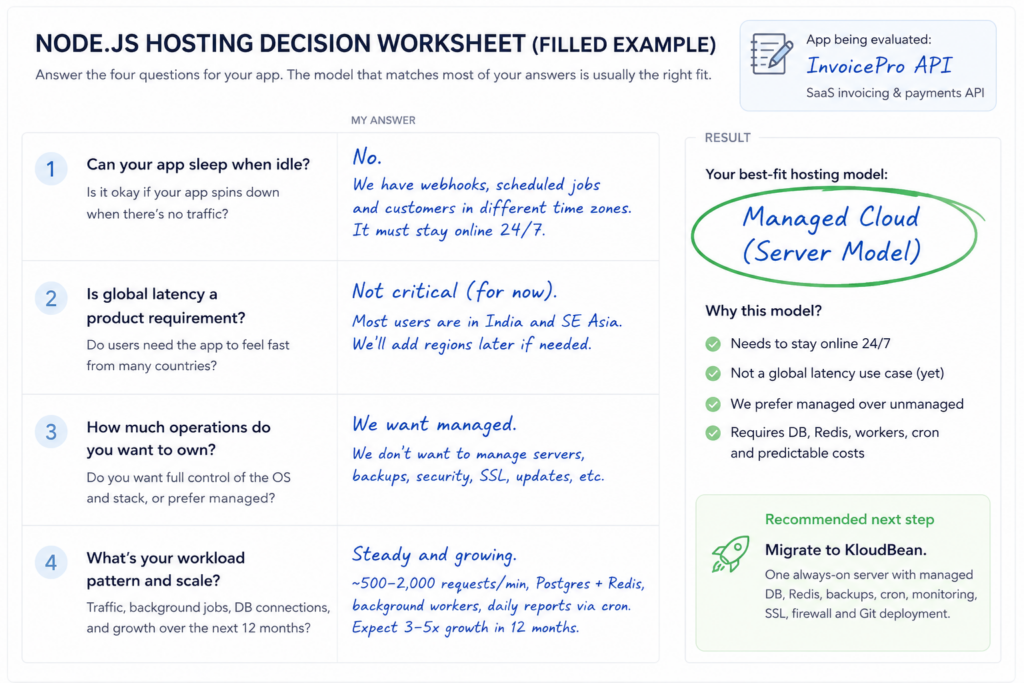
Pick the architecture before the brand. If your app can sleep when idle, a scale-to-zero platform is cheapest. If it is mostly a frontend with light API routes, a serverless frontend platform fits. If worldwide latency is a product requirement, edge containers are built for it. If you want control of the operating system and will do the operations, an unmanaged VPS gives you that. If your app has to stay awake, talk to a database, run background workers, and cost a predictable amount without turning you into a sysadmin, that is the managed cloud model, and it is the one most production Node apps land on.
Node.js hosting and Node.js deployment are different questions
Search “where should I host Node.js” and you get pricing pages. The deeper question, the one that actually decides whether the app survives real traffic, is “how should I run Node.js in production?” Those are different, and mixing them up is why a deploy that took four minutes turns into a month of firefighting.
It helps to see a Node deployment as three stacked layers. Every platform covers some of them and leaves the rest to you. The whole hosting decision is really a question of which layers you want to own.
Layer 1, the runtime. Node itself: the version, how it is installed, how it gets upgraded. Small layer, and easy to underestimate until a dependency needs a newer Node than the box has.
Layer 2, application infrastructure. The things that turn node server.js into a service: a process manager so a crash restarts instead of staying dead, a reverse proxy in front, TLS certificates and their renewal, environment variables, and somewhere the logs go that is not a terminal you closed.
Layer 3, production infrastructure. The database, a cache, background workers and cron, backups you have actually restored, monitoring, a firewall, and a deploy process that can ship a change without dropping requests.
What a production Node.js deployment actually needs
Before comparing anything, it is worth being concrete about the work. This is the gap between deploying Node.js and running Node.js in production, and it is longer than most first deploys assume.
- A pinned Node version. Build and run on the same major version. A native module compiled against a different one fails in ways that read like your code is broken.
- Process supervision. An unhandled rejection should restart the process, not end your uptime. PM2 is the usual answer in the Node world, and systemd does the same job without an extra dependency.
- A reverse proxy. Something in front terminating TLS, serving static files, and passing requests to your process. nginx in front of Node is the standard shape.
- TLS that renews itself. An expired certificate is a full outage caused by a calendar, which is a bad way to spend a Sunday. Automate the renewal rather than diarising it.
- Configuration outside the code. Secrets and connection strings in the environment, not the repository. Environment variables done right is the mental model.
- Somewhere logs land. Console output on a machine nobody tails is not observability. Structured logging is the difference between “the API broke” and a cause.
- Bounded database connections. One pool per process, sized against the database ceiling. Skip this and you meet
too many clients alreadyunder your first real load spike. See connection pooling. - Background workers and cron. Slow work belongs off the request path, in a queue with a worker draining it. BullMQ on Redis is the common Node pattern.
- Real-time connections, if you have them. WebSockets need a process that stays alive and shared state if you run more than one instance.
- Backups you have restored once. A backup nobody has tested is a rumour. The backups guide covers proving it.
- Repeatable deploys. Git push to live, with a way back. Zero-downtime deployments covers health checks, draining, and the migration order that bites people.
- A firewall and a locked-down database. Least privilege, allow-listed access, credentials rotated when someone leaves.
Nothing there is exotic. That is the point. Every one of those items exists whichever platform you choose, and the only question is whether the platform does it, sells it to you separately, or leaves it in your lap.
The four questions that decide your architecture
Answer these honestly about the app in front of you, not the app you hope to have in two years, and the shortlist collapses to one or two options.
- Can it sleep when nobody is using it? An internal dashboard can nap. A checkout endpoint cannot.
- Does it hold state or do work outside a request? WebSockets, queues, cron, in-memory caches, file uploads. Request-scoped platforms can handle some of these with extra architecture, and they fight you on others.
- Where does its data live, and who runs that? A Node app without a database is rare. Whether the database sits beside your app or on a separate vendor changes both latency and the bill.
- Do you want to operate a server, or just your application? This is the real fork, and it is a preference about how you spend your week, not a technical ranking.
Most teams over-weight the first deploy and under-weight month three, when traffic is real, a worker is running, the database has grown, and the invoice has changed shape. The deploy demo is the easiest part of any platform to make impressive.
The five ways to run Node.js, and what each optimises for
These are architectures, not brands. Several well-known platforms sit inside each one, and picking the model first is what stops the decision turning into a logo comparison.
1. Scale-to-zero platform. Your app sleeps when idle and wakes on the next request. Optimised for cost at very low traffic, which is exactly right for side projects, demos, and internal tools nobody touches at night. The trade is the wake-up: the first request after an idle period waits for the process to start, and free tiers on platforms like Render and Railway are where most people meet this. Fine for a demo, noticeable on anything customer-facing.
2. Serverless, frontend-first. Your code runs as short-lived functions behind a global CDN. Optimised for frontends and request-driven API routes, which is why it suits a Next.js application with light backend work. Vercel is the reference implementation here. For an always-on Node backend the model becomes less natural: long jobs, persistent connections, and durable workers all need designing around function limits rather than simply running. Those limits have moved a lot, and the current numbers versus the ones everyone still quotes is worth reading before you plan around a figure from an old tutorial.
3. Edge containers, many regions. Your app runs in several regions close to users. Optimised for genuine worldwide latency requirements, and Fly.io is the best-known example. The trade is operational surface: you are closer to the machine, and multi-region state is a problem you own. Worth being clear-eyed here, because the honest version of this trade applies to us too: a database primary lives in one region on any platform. Read replicas can sit elsewhere, but a globally distributed primary is not something a hosting choice hands you.
4. Unmanaged VPS. A Linux box and root access, from any provider. Optimised for control and the lowest sticker price. Everything in that layer-3 list above becomes your job, permanently, which is a fair trade when operations are part of the project, or something you enjoy, and an expensive one when they are not. The real cost of an unmanaged VPS puts numbers on the hours.
5. Managed cloud. A real server on a tier-1 cloud with the repetitive infrastructure work handled through a platform. Optimised for always-on applications that have a database, probably a worker, and an owner who would rather ship features than patch an operating system. You keep server-level flexibility, including root, while provisioning, the stack, TLS, patching, backups, and deploys run through a dashboard. The trade is the mirror image of model 1: there is no scale-to-zero, so an app that genuinely idles most of the day pays for a server it is not using.
The five models at a glance
Read this as a fit check. The right column is not a flaw, it is what each model traded away to be good at the middle column.
| Model | Optimised for | Pricing shape | What it trades away |
|---|---|---|---|
| Scale-to-zero platform | Idle apps, demos, internal tools | Free tier, then usage | Wake-up latency after idle |
| Serverless, frontend-first | Frontends with light API routes | Usage across several meters | Persistent processes and durable workers |
| Edge containers | Worldwide latency requirements | Usage, per region | Operational surface, multi-region state |
| Unmanaged VPS | Control and lowest sticker price | Flat and cheap | Your time, permanently |
| Managed cloud | Always-on apps with a database | Flat, per server | Scale-to-zero for idle projects |
Why pricing shape matters more than price
Two platforms can look similar per month and behave completely differently once traffic arrives, because they are priced on different axes. This is worth more attention than the headline number.
Metered pricing charges for what you consume: compute time, requests, invocations, data transfer, build minutes, and each database or worker as its own line. It is cheap when you are small, and it moves with your traffic, which means the number you can budget for is not the number you get in a busy month. Several meters combining is also why usage-based bills are hard to predict rather than merely expensive.
Flat server pricing charges for a machine of a chosen size. It costs the same whether you serve a hundred requests or a million, so you can forecast the infrastructure line before traffic arrives, and the cost of a traffic spike is measured in headroom rather than dollars. The flip side is real: an idle app pays for a server it is not using.
Neither shape is better in the abstract. They suit different risk appetites. If a surprise invoice would be a problem, that is an argument for a flat shape. If paying nothing during quiet periods matters more, metered wins. What you should not do is compare a quiet month on one against a busy month on the other, which is how most of these comparisons go wrong. What actually drives a hosting bill breaks the components down.
The sweet spot: your code, not your infrastructure
The reason managed cloud exists is that the two obvious options both ask you to give something up. A locked-down platform takes the operations away and some of your flexibility with it. A bare VPS hands you total flexibility and the entire layer-3 list. Most production applications want neither extreme: they want a real server they can reason about, without owning the repetitive work of keeping it healthy.
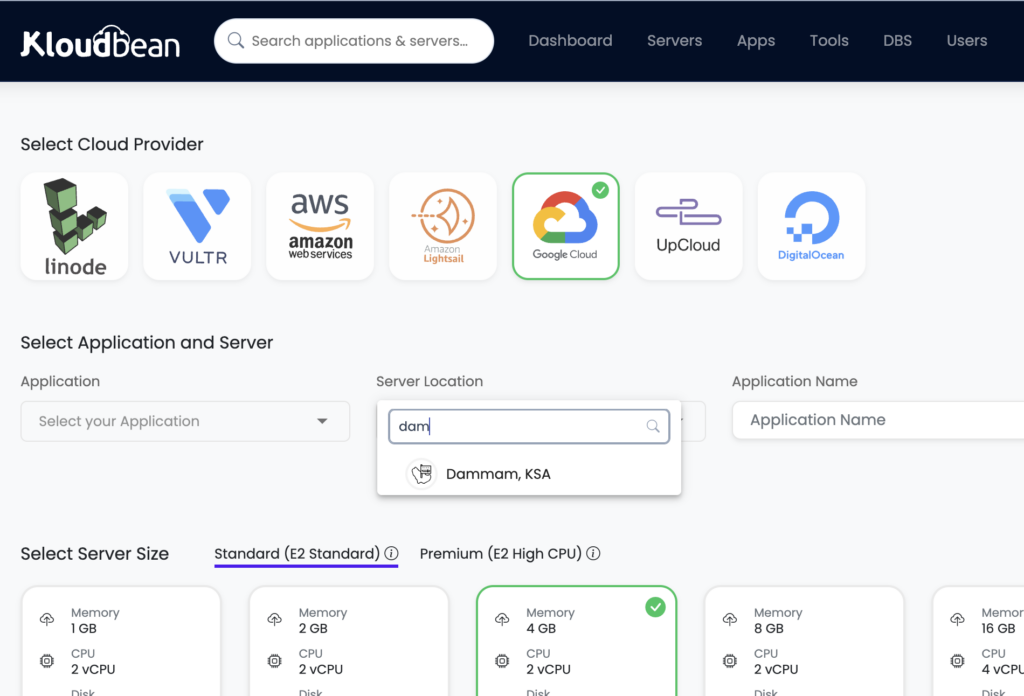
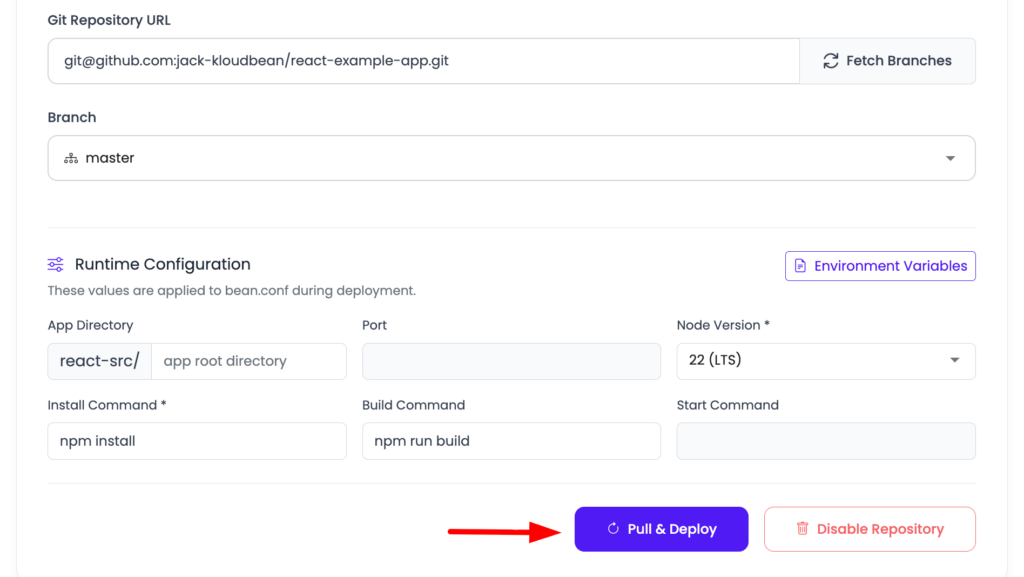
That is the category Kloudbean is built for. Your Node app runs as a persistent process on a real server across seven clouds (AWS, AWS Lightsail, Google Cloud, Linode, Vultr, DigitalOcean, and UpCloud), so there is no cold start on the first request and no scale-to-zero surprise. PM2 multi-process supervision keeps it up across cores. You connect a GitHub repository and managed CI/CD builds and deploys on every push, with deployment history and live build logs. Cron jobs and Node runtime configuration are editable in the dashboard rather than over SSH. Vertical resizing is self-serve when the app needs more room, and the built-in Flexible Load Balancer is there when one server stops being enough. You still get root if you want it.
On the data side, be precise about what “managed” covers, because the term gets used loosely. Kloudbean provisions the database engine for you and handles the server-level work around it: the box, patching, automatic and on-demand backups, and access control from the same dashboard. Seven engines are available as one-click launches (PostgreSQL, MySQL, MariaDB, Redis, Memcached, MongoDB, and Elasticsearch), and read replicas are one-click for MySQL and MariaDB on standard plans. What that does not mean is an independently orchestrated database service with automatic failover as a default toggle. High availability and cross-region topologies are architecture you plan deliberately, and the database primary lives in a single region. If you want the deeper trade, managed against self-managed databases covers it, and managed PostgreSQL hosting covers the engine.
Because the database can run on the same server as the app, it is reachable over the local network rather than a round trip to a separate vendor, and for managed DBS you lock it down by whitelisting your application server’s IP so nothing else can connect. That is the access model available on a everyone under standard plan. Private networking and VPC are part of the Enterprise package, alongside Kubernetes, autoscaling, and an immutable audit trail, so treat those as an enterprise conversation rather than a default. Plans start from $8/mo, and Enterprise is custom.
Where this model is the wrong answer, plainly: an app that idles most of the day will cost less somewhere that scales to zero, and if you need containers on a standard plan or automatic autoscaling, that is not what this is. Edge compute and serverless are genuinely different categories and kloudbean is not pretending to be them. What an always-on server plus a CDN in front does cover is the common version of the latency problem, where the goal is fast delivery to a spread-out audience rather than running compute in twelve regions.Serverless is great for certain workloads. But not every application needs infrastructure that disappears when traffic disappears. For applications that need to be always available, consistently responsive, and straightforward to operate, an always-on server can be the simpler and more predictable choice. That’s the space Kloudbean is built for.
Moving an existing Node app over
Moving an existing Node app over
If a bill or a cold start is what brought you here, the move is smaller than it feels. A standard Node app is three things: a repository, a set of environment variables, and a database. Nothing in that list is proprietary to any platform.
Bring the database across with ordinary tools. There is no export format to reverse-engineer:
# PostgreSQL: dump from the old provider, restore into the managed one
pg_dump "$OLD_DATABASE_URL" --no-owner --no-privileges -Fc -f app.dump
pg_restore --no-owner --no-privileges -d "$NEW_DATABASE_URL" app.dump

# MySQL or MariaDB
mysqldump -h OLD_HOST -u USER -p appdb > app.sql
mysql -h NEW_HOST -u USER -p appdb < app.sql
Then point the app at the new database, set the port from the environment rather than hard-coding it, and deploy:
# set on the server, never committed to the repository
DATABASE_URL=postgresql://appuser:[email protected]:5432/appdb
NODE_ENV=production

# your app reads the port it is given
# const port = process.env.PORT || 3000;
Run the new instance alongside the old one, verify it against real requests, and only then move DNS. Keeping the previous deployment alive until the replacement is proven is what keeps the cutover boring. If the app will not start on the new home, the cause is usually a missing environment variable or a wrong start command rather than anything about the platform, and a Node app crashing on deploy works through the usual suspects.
Which model fits, in one screen
The cheapest deployment is not the same thing as the cheapest production system. One is a price on a page; the other includes the hours you spend and the failures you absorb. So the summary is deliberately about your app, not about a winner.
- Hobby project, demo, internal tool that can sleep: a scale-to-zero platform, and do not pay for uptime you do not need.
- Frontend with light API routes: a serverless frontend platform, which is what that model is for.
- Worldwide latency as a genuine product requirement: edge containers, accepting the operational surface that comes with them.
- You want to own the operating system: an unmanaged VPS, with the layer-3 list on your plate. Managed against unmanaged is the honest version of that trade.
- Always-on Node, a database, background workers, a forecastable bill, and no desire to manage servers: managed cloud. This is the shape most production Node apps end up in, and it is the one Kloudbean is built around.
If your app needs to stay awake, talk to a database, run its workers, and keep serving customers without turning you into the sysadmin, that is where Kloudbean fits. Not as a better version of everything above, but as the right answer to one specific and very common architecture. Once you have picked the model, the hands-on walkthroughs go framework by framework: a Node app on managed cloud, Express, and NestJS.
Built for production Node.js
Always-on Node. With the database beside it.
Deploy from GitHub, run under PM2 on a real server across seven clouds, and launch your managed database from the same dashboard. Get automatic backups, free SSL, IP allow-listing, and a predictable server bill — without turning infrastructure into another job.
- GitHub deployment
- Always-on · no cold starts
- 7 managed databases
- Automatic backups
- Free SSL
- IP allow-listing
- Free migration
- Free trial
Standard plans from $8/mo · Free migration · Free trial
FAQ
Where should I host a Node.js app?
Decide the architecture first. If the app can sleep, use a scale-to-zero platform. If it is mainly a frontend with light API routes, a serverless frontend platform fits. If worldwide latency is a real requirement, edge containers are built for it. If you want to run the operating system yourself, use a VPS. If it has to stay awake with a database and background workers and you do not want to manage servers, that is the managed cloud model.
What is the difference between Node.js hosting and Node.js deployment?
Deployment is getting the code running once. Hosting in production means keeping it running: a pinned runtime, process supervision, a reverse proxy, renewing TLS, config outside the code, logs, a database with bounded connections, workers, backups, and repeatable deploys. Most platform disappointment comes from one that handles deployment well and leaves the production layer to you.
What Node version should I run in production?
An active long-term support release, pinned so build and run use the same major version. Node LTS lines arrive in April of even-numbered years and are supported for around three years, so track that rather than a specific number in an article. Pin it explicitly on the server, because native modules compiled against a different major version fail in confusing ways.
Do I need PM2 to run Node in production?
You need something that restarts the process when it dies and starts it on boot, and PM2 is the usual choice in the Node ecosystem. It also runs one worker per CPU core in cluster mode, which a single bare process cannot. systemd does the supervision job without an extra dependency but has no cluster mode. Running bare node with no supervisor is the thing to avoid.
How many database connections should my Node app open?
One pool per process, sized so that pool size times process count stays comfortably under the database limit. This is the detail people miss with PM2 cluster mode: four workers holding ten connections each is forty connections, not ten. Exceed the ceiling and queries start failing with a too many clients error under load.
Can I run WebSockets and background jobs on a Node host?
On an always-on server, yes: the connection stays open and a queue worker runs as its own process alongside the app. On request-scoped platforms it needs more design, because functions are short-lived, so shared state moves to an external store and durable jobs move to a queue service. If real-time connections or background work are central to your app, an always-on model is the smoother fit.
Do I need Kubernetes to deploy a Node app?
Usually not. Most Node apps run as one or a few processes under a supervisor on a single server, resized when they need more room, with a load balancer in front when one server is not enough. Kubernetes solves orchestration problems that arrive with many services and larger teams. On Kloudbean, Kubernetes and autoscaling are enterprise options rather than something a standard app touches.
Should my database be on the same host as my Node app?
It depends on your scale and requirements, though colocating is a good default for small and mid-sized apps. When the database runs on the same server it is reached over the local network rather than a round trip to another vendor, and there is one place to manage and back up. Separate it when you need independent scaling, a shared database across several apps, or a topology one box cannot provide.
Why is my usage-based hosting bill higher than expected?
Usually because several meters combine and one of them grew. Compute time, requests, data transfer, build minutes, and each database or worker can bill separately, so adding a worker, a preview environment, or steady traffic moves the total. Idle containers can also bill for allocated resources whether or not anyone uses them. Price a busy month rather than a quiet one, and check each provider’s current pricing.
How do I move a Node app to another host without downtime?
Point a new server at the same repository, copy the environment variables, and restore the database with a standard dump and load. Bring the new instance up and verify it against real requests while the old one still serves traffic, then move DNS once it is proven. Lowering the DNS record TTL a day beforehand shortens the switchover.
Does a managed Node host lock me in?
It should not. Your code stays in your own Git repository and your data stays in standard databases you can export with ordinary tools, so leaving is a dump and a clone rather than a rewrite. Check that before committing to any platform: if the exit path is a proprietary export format, that is the lock-in, not the pricing.
Kloudbean Engineering · Pick the home your app will still be happy in at month three.