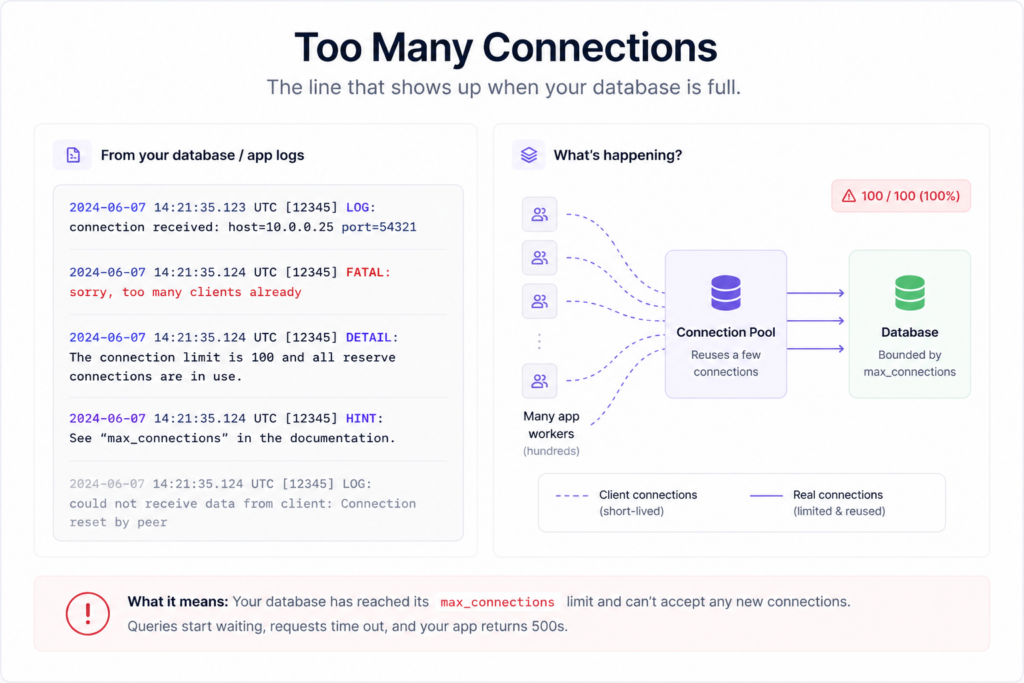
Your app was fine yesterday. Then traffic ticked up, and the logs filled with one line: FATAL: sorry, too many clients already. The database didn’t run out of CPU. It didn’t run out of disk. It ran out of connections. That’s what database connection pooling solves, and it’s the fix most teams reach for far too late, usually mid-incident.
This guide is the practical version. Why a connection costs so much, what that error means, and how to fix it at three levels: the driver pool in your app, a dedicated pooler like PgBouncer when many instances share one database, and the serverless connection storm. Real config and the sizing math nobody shows you.
A connection pool keeps a small set of database connections open and reuses them, instead of opening a fresh one for every request. You need it the moment your app runs more than a couple of concurrent workers, or the second you see too many connections. Fix it at three levels: a driver pool in your app (pg Pool, HikariCP, SQLAlchemy), a dedicated pooler like PgBouncer when many app instances hit one database, and a pooler in front of serverless functions to tame connection storms.
Why one database connection costs more than you think
People treat a connection like it’s free. It isn’t. In PostgreSQL, every connection is a separate backend process the server forks and keeps alive. Each one carries its own memory for sorts, joins, and caches, so a few hundred mostly-idle connections still burn real RAM and add scheduling overhead. That’s before a single query runs. And the default ceiling is low: a stock Postgres ships with max_connections = 100.
MySQL is a little lighter. It uses a thread per connection rather than a full process, but each thread still holds per-connection buffers and counts against a limit (the default max_connections is 151). Same shape of problem, smaller constant.
Then there’s the setup tax. Opening a connection means a TCP handshake, authentication, and often a TLS negotiation. Do that once and reuse it: cheap. Do it on every request and a query that should take 5 milliseconds spends more time just saying hello. This is the core reason PostgreSQL connection pooling matters more than for most databases: processes are heavier than threads, so wasting them hurts sooner.
The error everyone pastes into Google
Here are the strings people search at 2am, and what each one is really telling you:
- Postgres:
FATAL: sorry, too many clients alreadyand its cousinFATAL: remaining connection slots are reserved for non-replication superuser connections. - MySQL:
ERROR 1040 (HY000): Too many connections.
All of them mean the same thing. The database hit max_connections and started refusing new ones. Your app throws 500s, health checks fail, and it looks like the database fell over. It didn’t. It’s full, mostly of connections sitting idle, doing nothing but holding a slot.
Here’s the trap. This almost never shows up in development, where one process opens one connection. It shows up the day you scale out or hit a traffic spike. And it gets misread constantly: the database looks slow, so someone optimizes queries for an afternoon. Wrong layer entirely.
An opinion, from watching a lot of these go sideways: most “the database is slow under load” incidents aren’t slow queries at all. They’re connection exhaustion. The query that looks slow is really just a fast query waiting in line for a free connection that never comes. Check your connection count before you touch a single index.
What database connection pooling actually does
A pool is a set of already-open connections kept warm and ready. Instead of open, query, close on every request, your app borrows a connection, runs its query, and hands it back. It stays open for the next request that needs it. Reuse, not reopen.
The important part is the cap. A pool has a maximum size, and that limit is the whole point: your app never opens more than N connections, so it can’t exhaust the database on its own. When a spike arrives, extra requests wait a few milliseconds for a connection to free up instead of stampeding the server. A small, busy pool protects the database. A giant pool just moves the stampede.
Level 1: the driver pool, and how to size it
Start here, because for most apps this is the entire fix. Nearly every driver and ORM can pool for you, and many do by default. You just have to set the size on purpose instead of leaving it to luck.
node-postgres (pg)
import { Pool } from "pg";

const pool = new Pool({
  connectionString: process.env.DATABASE_URL,
  max: 10,                     // max open connections for THIS instance
  idleTimeoutMillis: 30000,    // close idle connections after 30s
  connectionTimeoutMillis: 5000
});

// borrow, query, return: the pool handles it
export const query = (text, params) => pool.query(text, params);
SQLAlchemy (Python)
from sqlalchemy import create_engine

engine = create_engine(
    os.environ["DATABASE_URL"],
    pool_size=10,        # kept-open connections
    max_overflow=5,      # extra burst connections when busy
    pool_pre_ping=True,  # drop dead connections instead of erroring
    pool_recycle=1800,   # recycle after 30 min
)
HikariCP (Java / Spring Boot)
# application.properties
spring.datasource.hikari.maximum-pool-size=10
spring.datasource.hikari.minimum-idle=2
spring.datasource.hikari.connection-timeout=5000
spring.datasource.hikari.idle-timeout=600000
A quick reference for the pool knob that matters in each stack:
| Stack | Pool setting | Notes |
|---|---|---|
| Node (pg) | max on Pool | Per process. Reuse one pool, don’t make one per request. |
| Python (SQLAlchemy) | pool_size + max_overflow | Real ceiling is the sum of both. |
| Java (HikariCP) | maximumPoolSize | The default connection pool in Spring Boot. |
| Go (database/sql) | SetMaxOpenConns | Unset means unlimited. Always set it. |
| Django | CONN_MAX_AGE | Persistent connection per worker. Multiplies by worker count. |
| Rails | pool in database.yml | Per process. Match it to your thread count. |
The connection pool size math nobody shows you
This is where teams get burned. Your total connections is not your pool size. It’s the pool size multiplied by every process talking to the database:
total connections = pool_size  x  app instances  x  worker processes

# real example
4 servers  x  4 workers each  x  pool of 10  =  160 connections
# Postgres default max_connections = 100  -->  you are already over the limit
Read that twice, because it explains most outages of this kind. Four modest servers with a “reasonable” pool of 10 quietly need 160 connections, and a default Postgres tops out at 100. Nobody set out to open 160. The multiplication did it.
So what’s a good connection pool size? Smaller than your instinct. A well-known starting point from the HikariCP project is roughly (CPU cores x 2) + effective spindles, near 9 or 10 on a 4-core box. That feels too low the first time you see it, but a small pool kept fully busy beats a huge one that thrashes the database. Treat any formula as a starting line, then measure and adjust. Workloads vary.
Level 2: a dedicated pooler (PgBouncer) when many instances share one database
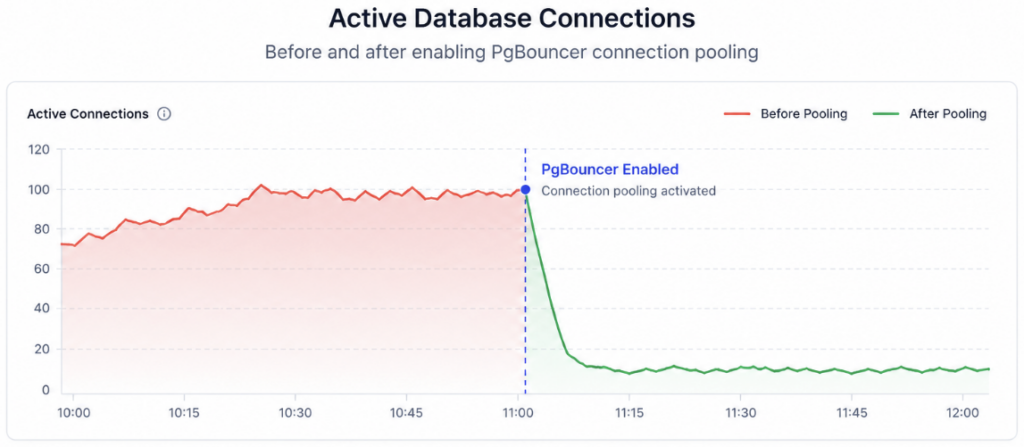
Driver pools have a ceiling. Picture 20 app instances, each with a pool of 10. That’s 200 connections wanted, and you can’t sensibly shrink each pool to 1. When many separate processes hammer one Postgres, you put a dedicated pooler between them and the database. PgBouncer is the standard choice: tiny and battle-tested. It holds a small set of real server connections and multiplexes thousands of client connections onto them.
PgBouncer has two modes, and picking the wrong one causes subtle bugs:
| Session pooling | Transaction pooling | |
|---|---|---|
| A server connection is held | For the client’s whole session | Only for one transaction, then returned |
| Multiplexing | Modest | Very high (thousands of clients onto dozens) |
| Best for | Long-lived clients, admin tools | Web apps with many short requests |
| Watch out for | Uses more connections | Breaks session state: server-side prepared statements, SET, LISTEN/NOTIFY, session advisory locks |
For a typical web app, transaction pooling is the big win. It’s how a pooler turns thousands of client connections into a few dozen real ones. The catch, and it’s a real one: because a connection isn’t tied to one client, anything relying on session state can misbehave. In practice you disable server-side prepared statements in your driver and avoid session-level features. A minimal config:
# pgbouncer.ini
[databases]
appdb = host=10.0.0.5 port=5432 dbname=appdb

[pgbouncer]
listen_addr = 127.0.0.1
listen_port = 6432
pool_mode = transaction
max_client_conn = 1000       # clients PgBouncer will accept
default_pool_size = 20        # real connections it opens to Postgres
Then your app points at PgBouncer’s port instead of Postgres directly. Keep that connection string in an environment variable, not in code (more on that in environment variables done right):
# was: [email protected]:5432/appdb   (straight to Postgres)
DATABASE_URL=postgresql://appuser:[email protected]:6432/appdb
One thing to be clear about: PgBouncer is a tool you run on your server, in front of your database. It isn’t bundled with the database. On the MySQL side, ProxySQL fills a similar role. Both sit in your infrastructure as a technique you choose, so you keep full control of the pooling behavior.
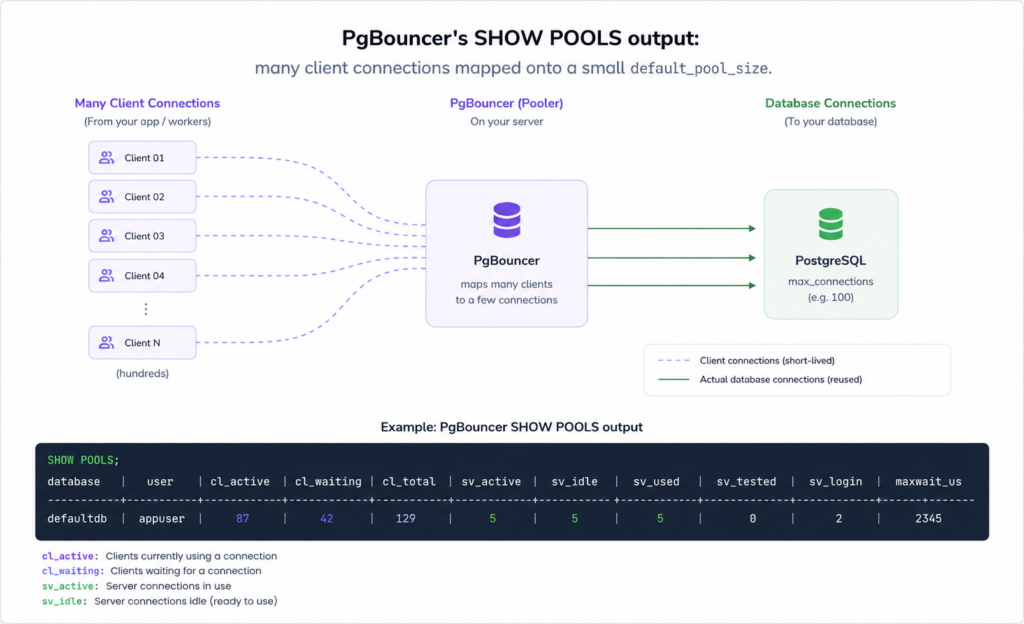
too many connections, and the driver pool you just tuned won’t help.Level 3: the serverless connection storm
Serverless breaks the driver-pool model in a way that surprises people. On Lambda, Vercel functions, or Cloud Functions, each function instance is isolated and short-lived. A pool inside one instance can’t be shared with the hundreds of others the platform spins up under load. So your neat pool is really one tiny pool per instance, times however many exist right now.
Then a spike hits, the platform scales to hundreds of concurrent instances, and each opens its own connection. That’s a connection storm, and it blows through max_connections almost instantly. This is the well-known pain of pairing serverless with a relational database, and why “how do I pool a serverless database” is such a common question.
The fixes, best first:
- Put an external pooler in front. PgBouncer in transaction mode between the functions and Postgres collapses thousands of connections onto a few real ones. The standard move for serverless plus Postgres.
- Use an HTTP or data-proxy layer. Some setups expose the database over an HTTP driver so functions never hold a raw TCP connection. It sidesteps the storm by design.
- Keep each function’s pool tiny. Max of 1, with an aggressive idle timeout so a cooling instance releases its connection fast. A patch, not a cure.
My honest take: if you’re running serverless functions against Postgres at any real traffic, a pooler in front isn’t optional. Plan for it on day one. The flip side is worth naming too. An always-on app server sidesteps this entirely, because one long-running process keeps one healthy pool, no storm to fight.
How this maps to a managed database
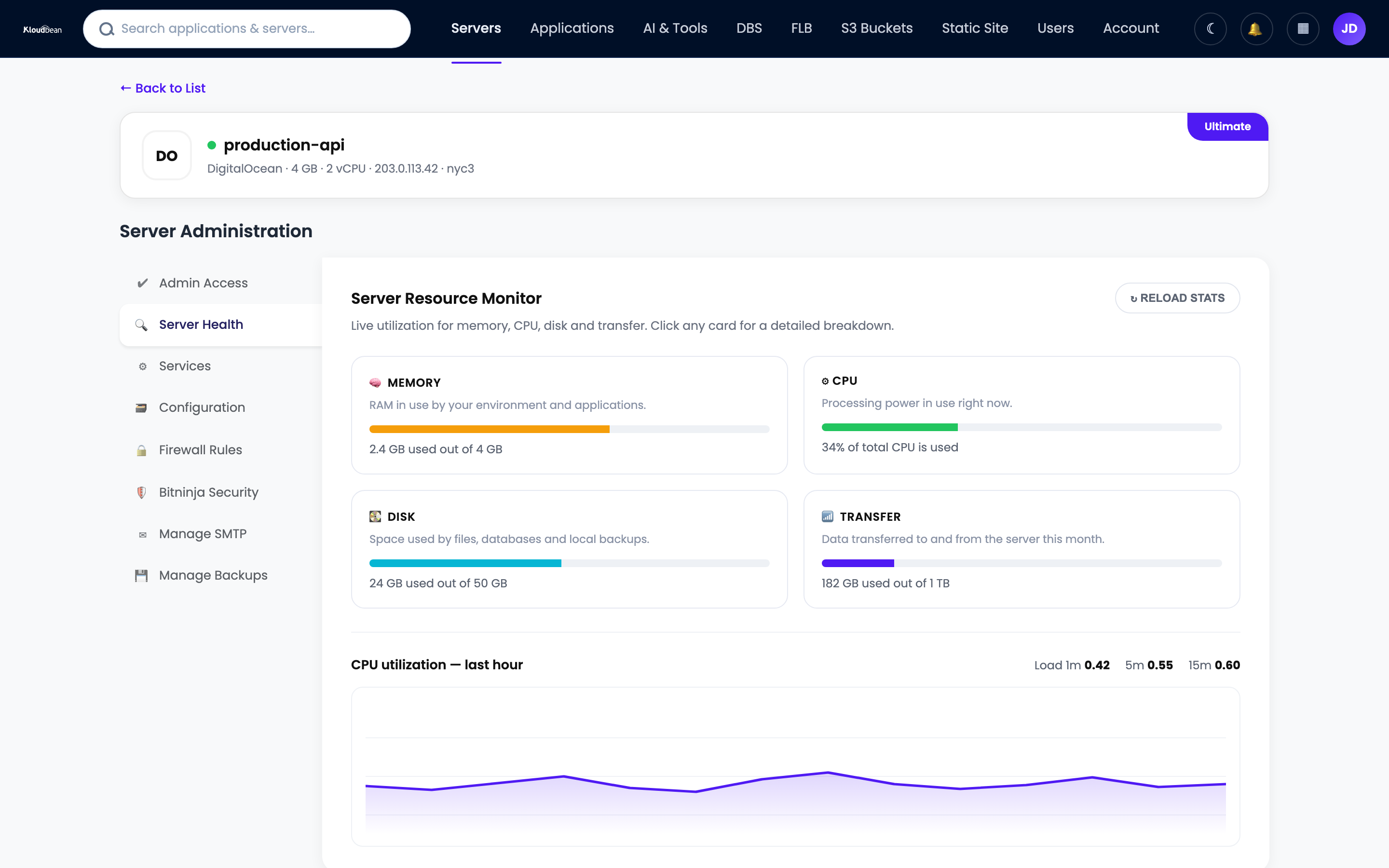
Pooling is a technique you implement, not a product you buy. On Kloudbean you launch a managed PostgreSQL or MySQL that’s provisioned, kept on a private network, and backed up automatically. The pooling lives in your app: your driver’s pool for the common case of one always-on server, or PgBouncer and ProxySQL on your server when many instances share one database. You keep full control of the pool behavior.
Because a Kloudbean app runs as a long-lived process rather than per-request serverless, a normal driver pool covers most apps cleanly and never triggers the storm. A bigger database is a resize, not a migration. And it’s worth separating two problems: pooling fixes connection pressure, while read volume is a different axis, the job of read replicas. Caching hot reads in managed Redis takes load off the database (and its connections) before you scale anything. The full picture of wiring a database into your app lives in adding a managed database to your app.
FAQ
What is database connection pooling, and when do I need it?
Connection pooling keeps a small set of database connections open and reuses them across requests, instead of opening and closing a new connection every time. You need it once your app runs more than a couple of concurrent workers, or the moment you see a “too many connections” error. Most drivers and ORMs can pool for you once you set the pool size deliberately.
What causes the “sorry, too many clients already” error in Postgres?
It means Postgres has reached its max_connections limit and is refusing new connections. Usually it’s not one greedy process but many: the pool size multiplied by every app instance and worker process talking to the database. It tends to appear under load or after you scale out, not in development, which is why it surprises people.
What is a good connection pool size?
Smaller than most people expect. A common starting point from the HikariCP project is roughly CPU cores times two, plus effective spindles, which on a 4-core box is around 9 or 10 per instance. A small, fully-busy pool usually beats a large one that thrashes the database. Treat any formula as a starting line, then measure your real concurrency and adjust.
What is PgBouncer, and do I need it?
PgBouncer is a lightweight connection pooler that sits between your app and PostgreSQL, holding a few real server connections and multiplexing many client connections onto them. You need it when many separate app instances share one database and their combined driver pools would exceed max_connections. For a single always-on app server, a driver pool alone is often enough.
Transaction pooling vs session pooling, what’s the difference?
In session pooling a real server connection is tied to a client for its whole session, which is safe but uses more connections. In transaction pooling the connection returns to the pool after each transaction, which multiplexes far more aggressively and suits web apps. Transaction mode can break session-level features like server-side prepared statements and LISTEN/NOTIFY, so configure your driver for it.
How do I pool connections for a serverless database?
Put an external pooler like PgBouncer in transaction mode between your functions and Postgres, so hundreds of short-lived function connections collapse onto a few real ones. Alternatively use an HTTP or data-proxy layer so functions never hold raw connections. Serverless breaks the normal driver pool because each function instance is isolated and can’t share a pool with the others.
Does connection pooling work with both PostgreSQL and MySQL?
Yes. Both have driver-level pools and both hit a max_connections limit, so pooling helps either way. PostgreSQL feels the pain sooner because each connection is a separate backend process, while MySQL uses a lighter thread per connection. For dedicated poolers, PgBouncer is standard for Postgres and ProxySQL is common for MySQL.
Is connection pooling the same as a read replica?
No, they solve different problems. Pooling limits how many connections your app opens, which fixes connection exhaustion. A read replica adds read capacity by serving SELECTs from a synced copy of the database. If your bottleneck is too many connections, pool first. If it’s read volume, that’s a read replica question, and they can be used together.
Kloudbean · Fewer connections, more headroom.