Point a tool like Shodan at the open internet and you’ll turn up thousands of databases answering to anyone who knocks. No private network in front of them. No VPN. Just a database port hanging out in public.
Most of those weren’t left open on purpose. Someone spun up a server, gave the database a public address so they could reach it from their laptop, shipped the feature, and forgot. A VPC is how you stay off that list. So what is a VPC? Short for Virtual Private Cloud, it’s a private, isolated network for your own resources inside the cloud, where the sensitive parts of your stack never get a public door at all.
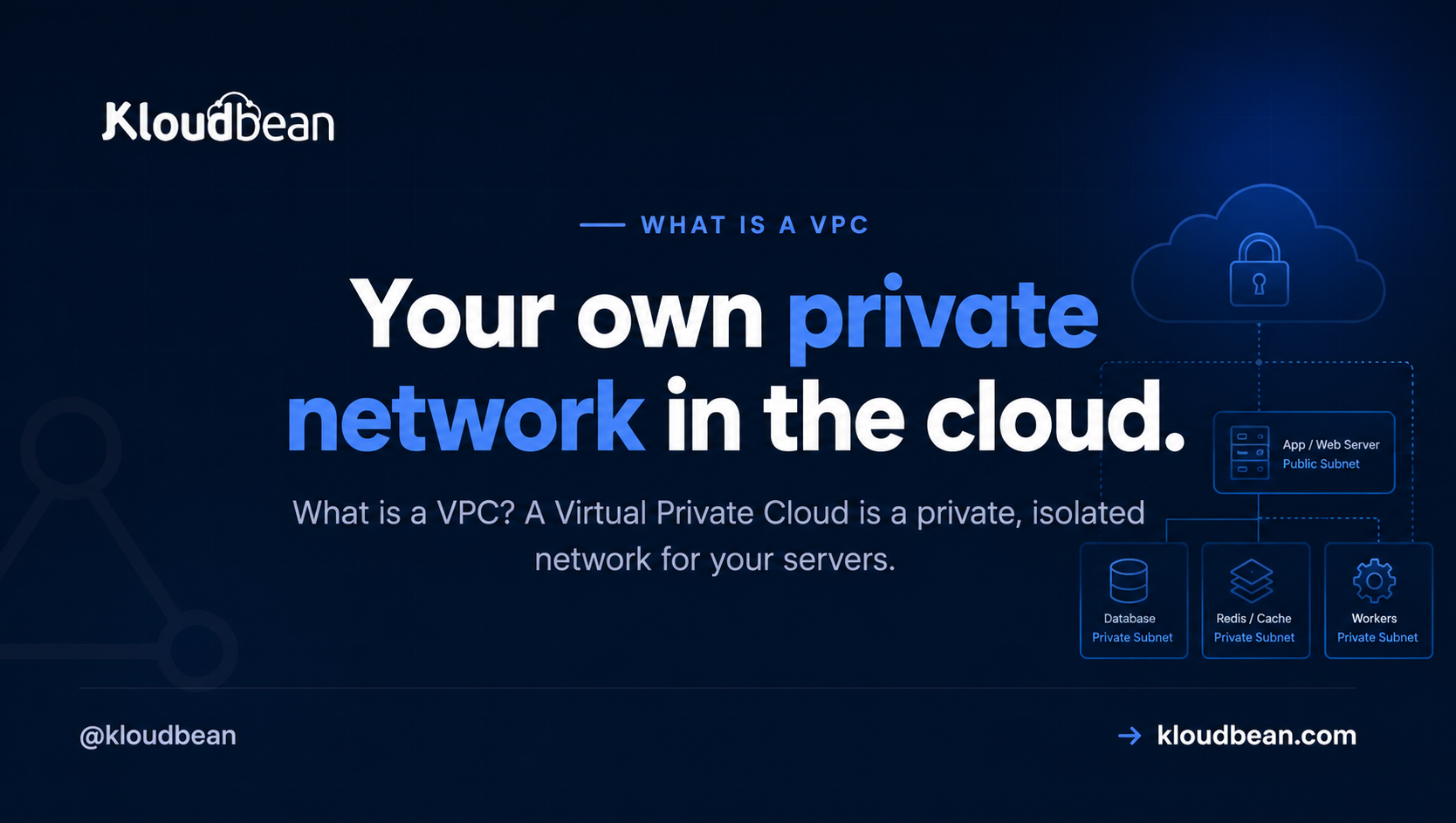
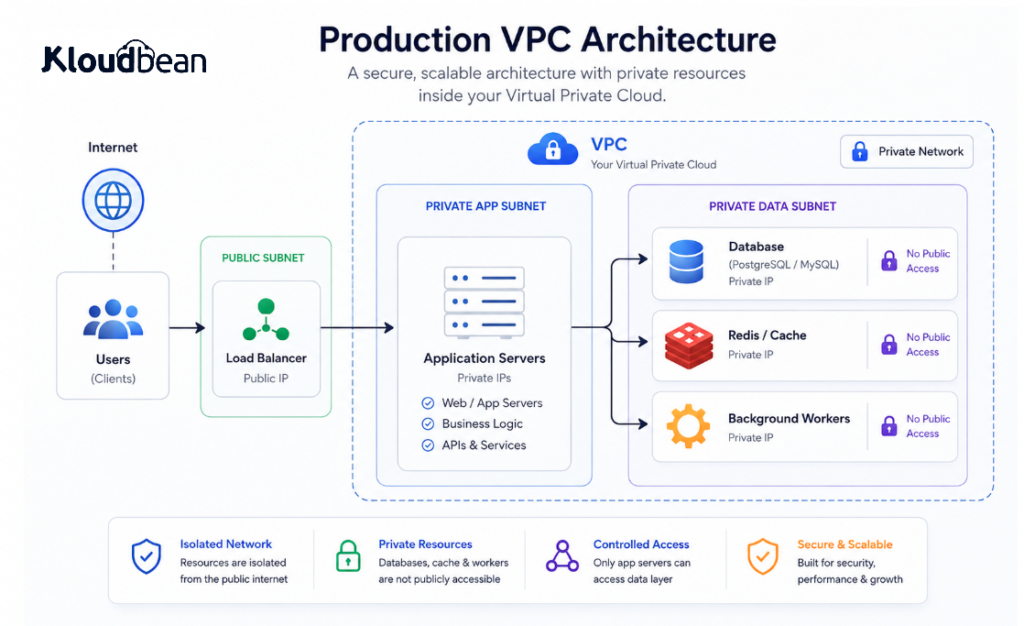
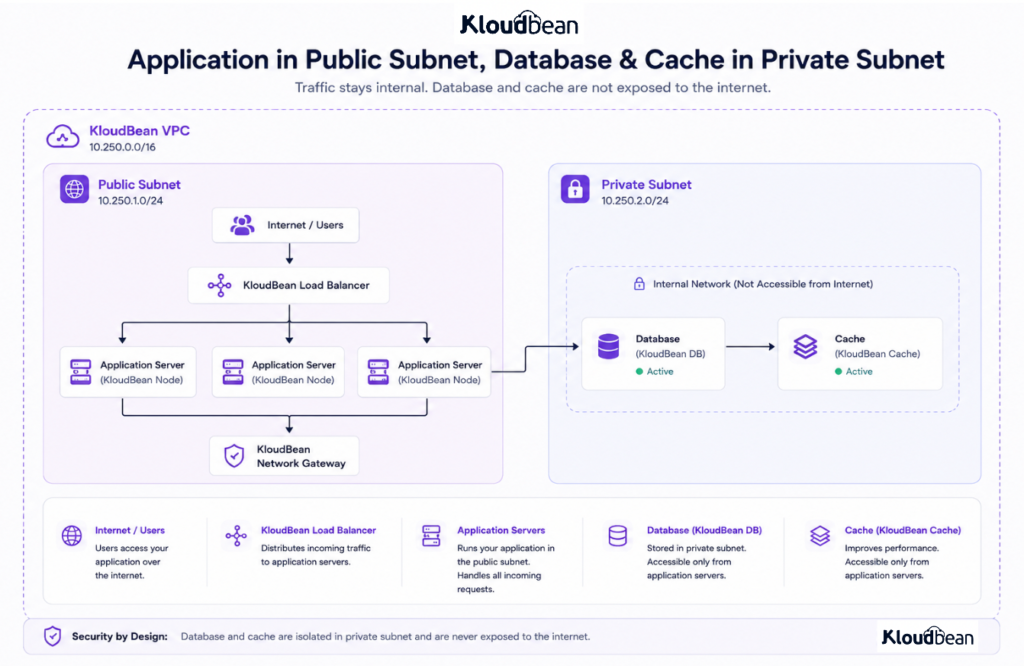
A VPC (Virtual Private Cloud) is your own private, isolated network inside the cloud. Public-facing things like your web app go in a public subnet. Sensitive things like your database and cache go in a private subnet with no public address. Your app reaches the database over an internal private IP, and the open internet has no route to it.
VPC architecture: what actually lives inside it?
A VPC starts making sense when you stop thinking of it as “the place where the database lives” and start thinking of it as the network boundary around your whole application.
A production stack rarely has just two machines. You might have a load balancer taking traffic from the internet, application servers running your code, a database holding customer data, Redis handling sessions and cache, background workers processing jobs, and internal services talking to each other behind the scenes.
They don’t all need the same level of exposure.
The load balancer needs a public address because customers have to reach it. The application servers may need carefully controlled inbound access. The database and Redis usually don’t need a public address at all. They only need to answer the application and the workers that actually use them.
That’s what the VPC gives you: one network boundary, with different resources inside it and deliberate paths between them.
Think of it less like a single locked room and more like an office building. The front desk is public. The staff areas aren’t. The server room certainly isn’t. Everyone can enter the building through the front door, but that doesn’t mean everyone gets a key to every room.
So what is a VPC, exactly?
A VPC is a walled-off slice of a cloud provider’s network that belongs to you. Inside that boundary, your resources get private addresses and can talk to each other over an internal network. Nothing inside is reachable from the outside world unless you deliberately hand it a public address and open a path to it.
That last part is the whole game. By default you keep everything private, then you poke exactly one hole for the traffic that genuinely needs to come in from the internet. Your web server. Maybe a load balancer. That’s usually it. Everything else stays in the back.
Public subnet, private subnet: the split that does the work
A VPC gets carved into subnets, which is just a fancy word for “sections of the network.” You’ll deal with two kinds:
- A public subnet for things that must face the world. Your web or app server lives here, and so does a load balancer if you run one. These get public addresses on purpose.
- A private subnet for things that must not face the world. Your database, your Redis cache, internal APIs, background workers. These get private addresses only.
Private addresses come from reserved ranges: 10.0.0.0/8, 172.16.0.0/12, and 192.168.0.0/16. Those blocks aren’t routable across the public internet. So a machine that only has a private IP can’t be dialed up from outside, full stop. It isn’t hidden behind a clever lock. It has no phone number the internet can call.
Follow one request through a VPC
Watch a single page load and the design clicks. A visitor’s browser hits your app at its public address. That’s allowed. It’s the front door, and it’s the only door. The app then needs data, so it opens a connection to the database at a private address like 10.0.4.12:5432. That hop happens entirely inside the VPC, over the internal network, and never touches the public internet.
The visitor has no route to the database. Not a locked one. None. They talk to the app, the app talks to the database in the back, and the two conversations never mix. You’ve shrunk the attack surface by removing a door, which beats guarding one.
What should be public and what should be private?
There isn’t a rule that says every server in a VPC has to be private.
The useful question is simpler: does this resource actually need to accept connections from the public internet?
If the answer is no, don’t give it a public door.
A typical application might look like this:
| Resource | Typical exposure |
|---|---|
| Load balancer | Public |
| Web server | Public or restricted |
| Application server | Restricted |
| PostgreSQL / MySQL | Private |
| Redis | Private |
| Background workers | Private |
| Internal API | Private |
| Admin services | Restricted |
The database is the obvious example. A visitor needs to reach your website. They don’t need to reach PostgreSQL on port 5432.
The same thinking applies to Redis on 6379, internal APIs, queues, workers, and anything else that exists to support the application rather than serve the public directly.
The fewer things you expose, the fewer things you have to defend.
VPC vs VPN vs firewall: what’s the difference?
These terms get thrown around together so often that it’s easy to treat them as the same thing. They aren’t.
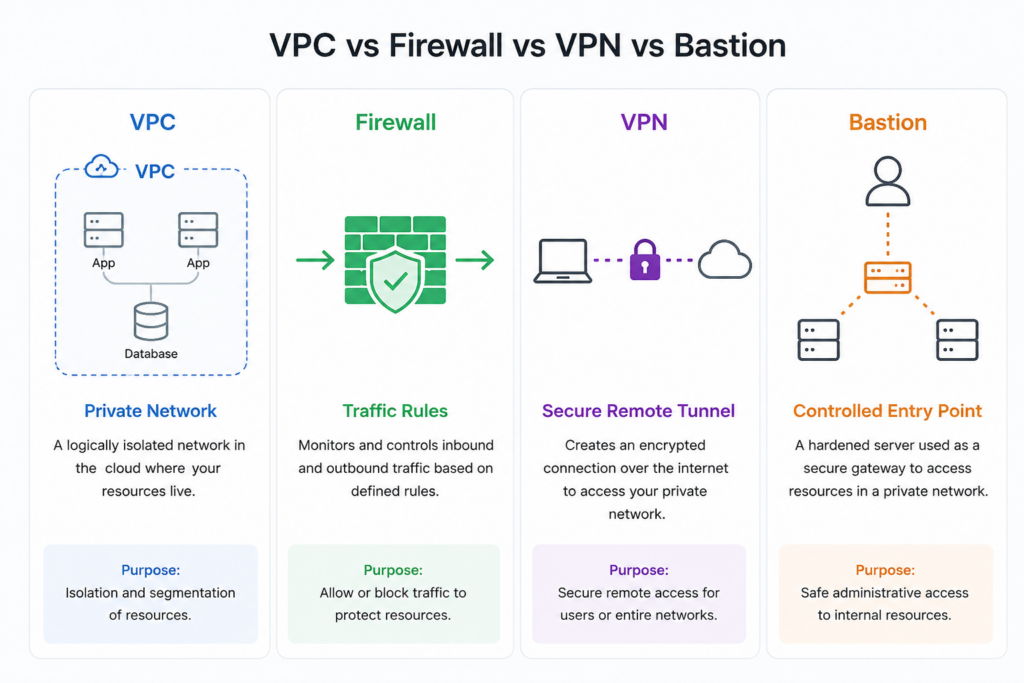
A VPC creates the private network itself.
A firewall decides which traffic is allowed through that network.
A VPN creates a secure tunnel so a person, office, or another network can reach resources that aren’t publicly exposed.
A bastion host is a controlled entry point you can use for administrative access to private resources.
They solve different problems, and a production environment can use several of them at the same time.
For example, your application can sit behind a public load balancer, your database can live on a private network, firewall rules can allow only the application servers to reach port 5432, and your engineers can connect to the private environment through a VPN or bastion when they need to troubleshoot something.
That’s layered networking.
You don’t ask one technology to do everything. You give each layer one job and keep the boundaries clear.
Security groups: deciding what’s allowed to talk to what
A private subnet keeps the internet out. Security groups (some clouds call them network ACLs or firewall rules) control traffic inside the fence. Think of a security group as a short allow-list attached to a resource. The database’s rule might read: accept connections on port 5432 from the app servers only, and refuse everything else.
The habit worth building is default-deny. Start with nothing allowed, then open the specific paths your app actually needs. On Kloudbean every server also ships with a Shorewall firewall and Fail2ban turned on from the start, so brute-force login attempts get throttled and blocked without you configuring anything. That’s the network-layer equivalent of least privilege: a resource can reach exactly what its job requires and nothing else.
How to design a VPC for a production application
You don’t need to start with a complicated network diagram.
Start with the traffic.
First, identify what needs to receive traffic from the internet. Usually that’s your load balancer or web application.
Then identify what should never receive traffic from the internet. That’s usually your database, cache, background workers, internal APIs, and other supporting services.
Then draw the connections between them.
Your application might need:
Internet
   ↓
Load Balancer
   ↓
Application Servers
   ├──→ PostgreSQL
   ├──→ Redis
   └──→ Internal API
Now ask a very boring but useful question about every arrow:
Who actually needs to talk to this resource?
If the answer is “the application servers,” the database shouldn’t accept connections from everywhere.
If the answer is “the background worker,” don’t open the resource to the entire VPC just because it’s easier.
This is where least privilege becomes practical rather than theoretical. You aren’t trying to make the network complicated. You’re trying to make every connection intentional.
Why a public database is a breach waiting to happen
This is the part I’ll be blunt about. A database reachable from the open internet is a breach waiting to happen, so keep data services off the open internet from day one. Automated scanners sweep the entire IPv4 space constantly, and an open database with a weak or default password gets found fast, sometimes within hours of going live.
Remember the “Meow” attacks in 2020? A bot roamed the internet finding exposed databases and simply wiped them, overwriting thousands of unsecured Elasticsearch and MongoDB instances with the word “meow” and no ransom, no warning. The common thread wasn’t a clever exploit. It was databases left facing the public internet. A private subnet removes that entire category of mistake before you can make it.
| Database on the public internet | Database in a private subnet | |
|---|---|---|
| Address | Public IP, reachable anywhere | Private IP only |
| Who can connect | Anyone who finds the port | Only your app, from inside |
| Attack surface | The whole internet | Your own network |
| If credentials leak | Direct hit, they can log straight in | They still can’t route to it |
| App-to-DB latency | A detour through public routing | A short internal hop |
Common VPC mistakes that quietly undo the isolation
A VPC can be configured badly just as easily as it can be configured well.
The first mistake is giving a private resource a public IP because it’s convenient during development. That one shortcut can survive all the way into production.
The second is opening a port to 0.0.0.0/0 when only one application server actually needs access. It works, which is why people do it. It also gives far more machines access than the application needs.
The third is allowing everything inside the VPC to talk to everything else. Private networking is not the same thing as unrestricted networking.
The fourth is forgetting that private resources may still need controlled outbound access. Package updates, external APIs, monitoring agents, and other services can require a route out.
And the fifth is assuming the VPC itself makes the application secure.
It doesn’t.
A VPC protects the network boundary. It doesn’t fix vulnerable application code, leaked credentials, an outdated operating system, or a compromised public-facing service.
The point is not to build one giant wall and call the system secure.
It’s to remove unnecessary doors and then secure the doors that remain.
How this looks on a managed platform
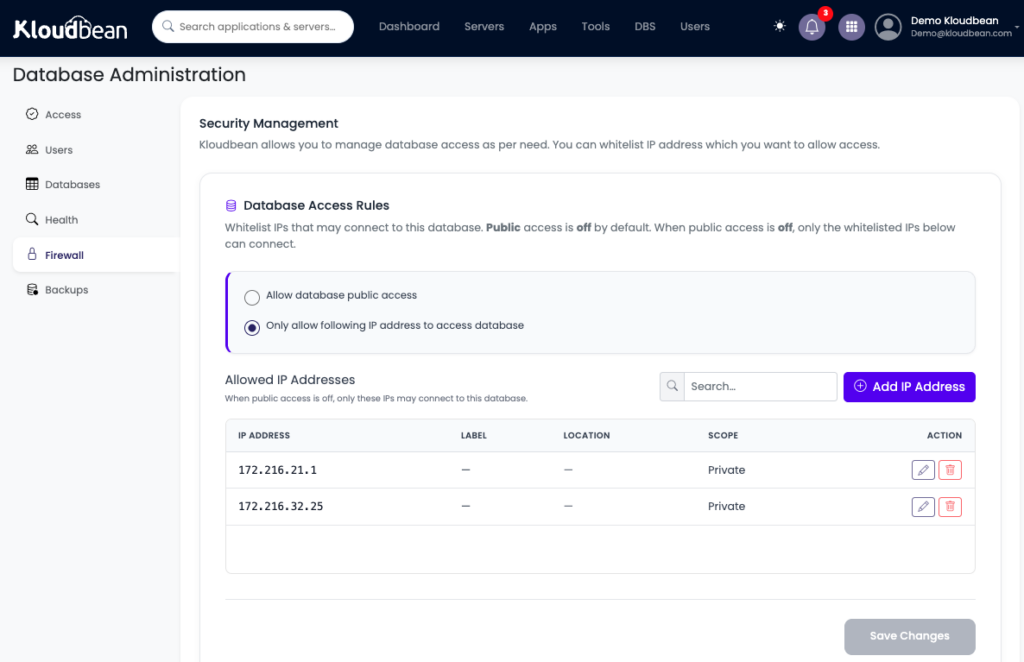
You rarely hand-build this anymore, and honestly you shouldn’t have to. On Kloudbean the everyday way to lock a managed database down is IP Access Control: you whitelist your app server’s IP address on the database, so only that server can connect and everything else is refused. Pair that with strong credentials and free SSL, and your data service stops answering strangers. If you need full network isolation, with the database in its own private subnet and no public address at all, that is the VPC (private networking) available on Enterprise plans.
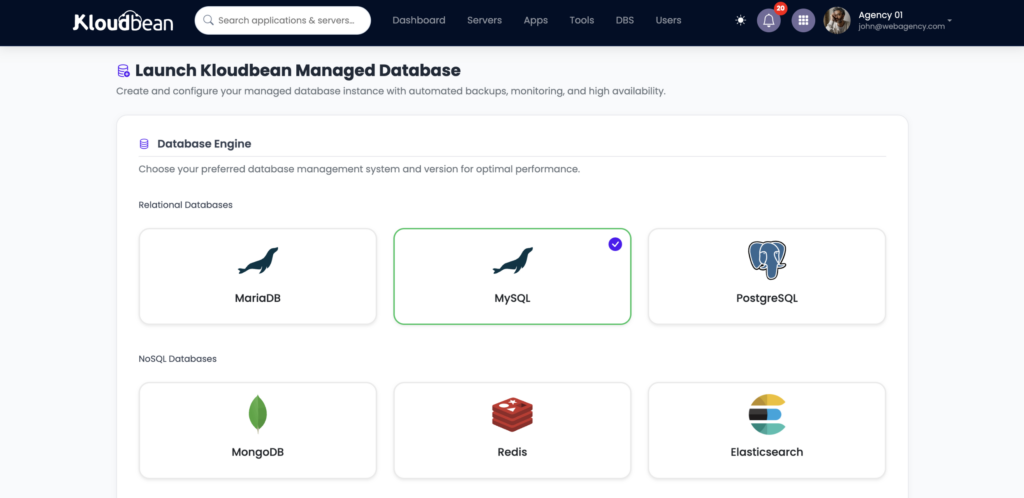
Your app server faces visitors, and the database answers only the IP you whitelisted. If you want the deeper how-to, see adding a managed database to your app, or the engine-specific guides for managed MySQL and managed Redis. Enterprise and custom setups can run in their own dedicated VPC when isolation requirements go further.
A Production VPC Checklist
Before calling a network architecture production-ready, walk through the boring stuff.
The best VPC is usually not the one with the most complicated diagram.
It’s the one where you can explain every connection.
You know what is public.
You know what is private.
You know which service can talk to which.
And when something changes, you know exactly which rule needs to change with it.
The one mistake that quietly undoes it
If there’s a single trap here, it’s giving the database a public address “just so I can connect from my laptop.” That puts the door back on the street and cancels the whole point of the VPC. Do the tidy thing instead: tunnel in through your app server over SSH, or use a bastion host, and leave the database on its private IP. It’s one extra step at setup and it keeps you off the scanner lists for good.
How to test whether your VPC is actually private
Don’t trust the diagram.
Test it.
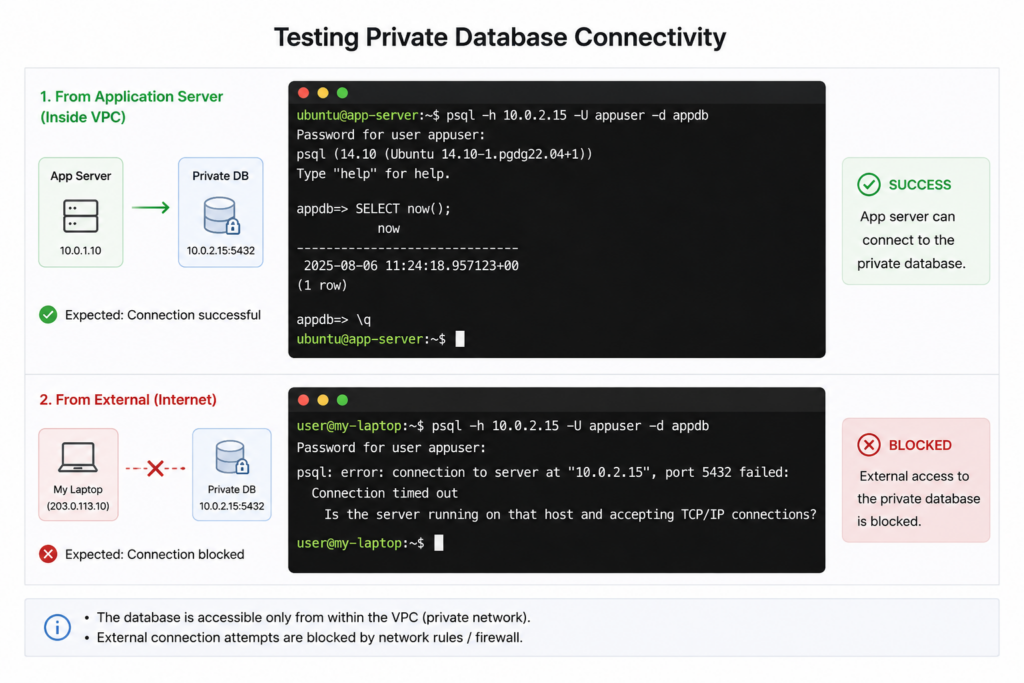
From the application server, connect to the database using its private address. If that works, you’ve proved the application has the path it needs.
Then test from outside the network.
The database shouldn’t be reachable from the public internet. If you can connect to port 5432 or 3306 from an unrelated external machine, you’ve found a problem.
You can think of the test as two simple questions:
Application server
       ↓
Private database IP
       ↓
Connection succeeds ✓


External machine
       ↓
Database port
       ↓
Connection blocked ✓
The first proves that the application can do its job.
The second proves that everyone else can’t.
That’s much more useful than simply looking at a dashboard that says “private.” And using Kloudbean Enterprise or Premium plan can get you this as a all managed for you system.
What a VPC won’t do for you
A VPC is one strong wall, not the whole castle. It gives you network isolation. On Enterprise, a managed Linux platform can wire that private networking up for you as a private subnet. On a standard plan you get the same practical safety by whitelisting your app server’s IP, so the database only answers that one machine. But it only guards the network layer. You still have to secure the public-facing app that does have a door, write code that doesn’t leak, protect your credentials, and keep the stack patched.
Think of it as layered defence. A VPC handles one important layer very well. The rest still needs attention, which is why it pairs naturally with DDoS protection, hardened application hosting, and, for regulated teams, data residency controls and single-tenant isolation. Take the database off the sidewalk first. Then keep locking the doors that remain.
Build your production stack
inside its own private network.
Give your enterprise applications a network boundary designed around how your infrastructure actually communicates. Isolate application, database, cache and internal services with private networking, controlled access, VPN and bastion connectivity.
Your database belongs in the back room.
Keep it off the open internet by whitelisting your app server’s IP, so only your app can connect, on infrastructure you actually own. Managed databases with IP Access Control, a Shorewall firewall and Fail2ban on every server, automatic backups, and free migration help to get there. Need a fully isolated private subnet? That is the VPC on Enterprise.
Start free at kloudbean.com · see plans on pricing.
IP allow-listing · Managed databases · Shorewall + Fail2ban · Automatic backups · Free migration · Free trial
FAQ
What is a VPC in simple terms?
A VPC (Virtual Private Cloud) is your own private, isolated network inside the cloud. Resources you put in it talk to each other over private addresses, and you choose exactly what, if anything, gets exposed to the public internet. The simple picture: a shop with a public front counter and a private back room only staff can reach.
What is a VPC used for?
Keeping the sensitive parts of your stack off the open internet. Your database, cache, and internal services live in a private subnet with no public address, while your web app sits in a public subnet and talks to them privately. It also keeps internal traffic internal, which is tidier and usually a little faster.
What’s the difference between a public and private subnet?
They’re the two sections of a VPC. A public subnet holds resources that need to face the world, like your web server. A private subnet holds resources that shouldn’t, like your database and cache. Machines in a private subnet only have private IPs, so the public internet has no route to them.
Why should my database be inside a VPC?
Because it holds your most sensitive data and should never answer the open internet. Inside a private subnet it has no public address, so only your own app can reach it. Scanners constantly hunt for exposed databases, and a private network means yours simply isn’t there to find.
Is a VPC the same as a VPN?
No, and people mix them up. A VPC is a private network that your cloud resources live inside. A VPN is a secure tunnel that lets a person or office connect into a private network from somewhere else. You might use a VPN to reach resources that live in a VPC, but they’re solving different problems.
What is a security group in a VPC?
A security group is a small allow-list attached to a resource that decides which traffic it accepts. A database’s security group might allow port 5432 from the app servers only and deny everything else. Start default-deny, then open the specific paths your app needs.
Do I have to set up a VPC myself?
On a good managed platform, mostly no. Building a full VPC by hand can be fiddly. On Kloudbean the everyday protection is simpler: you whitelist your app server’s IP on the database, so only that server can connect. A fully isolated private subnet (a dedicated VPC) is available on Enterprise, without you configuring routing tables.
Can I still connect to a private database from my laptop?
Yes, without giving it a public address. Tunnel in through your app server over SSH, or use a bastion host, and connect through that. It’s one extra step and it keeps the database on its private IP where it belongs, instead of exposing it to the whole internet for convenience.
Does a VPC make my app fully secure?
No. It secures the network layer by taking sensitive resources off the public internet, which is a big win, but it’s one wall in a layered defence. You still have to secure the public-facing app, write safe code, protect credentials, and keep everything patched.
Does a VPC cost extra or slow things down?
On Kloudbean, a dedicated VPC (private networking) is an Enterprise capability, while standard plans lock the database down with IP allow-listing at no extra cost. As for speed, keeping the database close to your app helps: they talk over a short internal hop instead of taking a detour through public routing.
Kloudbean · Keep the database off the open internet.