An app that runs flawlessly on your laptop and 503s the instant you deploy it is almost always telling you one thing: a variable that lived on your machine never made it to the server. Environment variables for a deployed app are the least glamorous part of shipping, and reliably the part that breaks the first deploy. Whether you built in Lovable, v0, or Cursor, the fix is the same, and it starts with a mental model most tutorials skip. There are only two kinds of environment variable, and almost every env-var bug is a confusion between the two.
The short version
Every environment variable is one of two kinds. Build-time variables (prefixed
NEXT_PUBLIC_,VITE_, orREACT_APP_) get baked into the browser bundle when you build, so they’re public and can never hold a secret. Runtime variables (DATABASE_URL, API keys) are read live by the server, stay off the browser, and can change without a rebuild. Set them in Runtime Configuration, keep secrets unprefixed and out of Git, and redeploy after changes. A missing one is the top cause of a first-deploy 503.
There are only two kinds of environment variable
Almost everything that goes wrong with env vars comes from not knowing which kind you’re holding. So here’s the whole model, and once it clicks the rest is mechanical.
A build-time variable is read once, while your app is being built, and its value is written directly into the JavaScript that ships to the browser. It’s frozen in the bundle from that moment. Because it lands in the browser, it’s public by definition, and frameworks force you to opt in with a prefix so you can’t leak a secret by accident. A runtime variable is read live by the server process, every time the app runs. It never goes near the browser, you can change it without rebuilding, and it’s where every secret belongs.
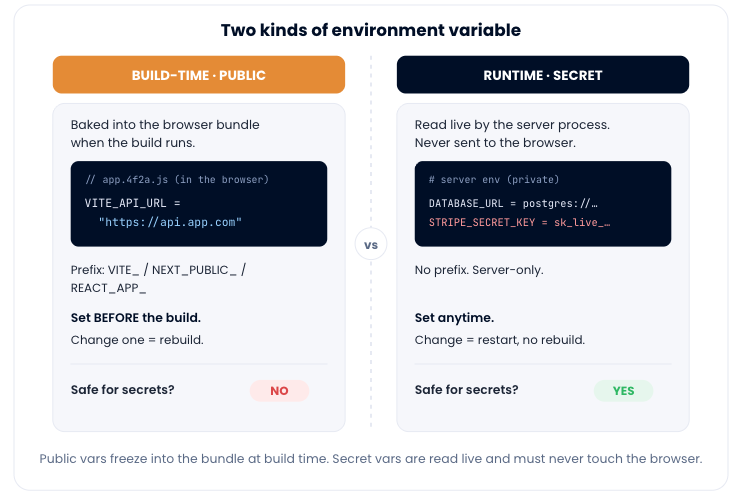
Put side by side, the differences that actually matter come down to this:
| Build-time variable | Runtime variable | |
|---|---|---|
| Prefix | NEXT_PUBLIC_, VITE_, REACT_APP_ | None (plain name) |
| Read when | Once, during build | Live, on every request |
| Ends up in | The browser bundle | The server process only |
| Visible to users? | Yes, fully public | No |
| Change without rebuild? | No, rebuild required | Yes, just restart |
| Safe for secrets? | Never | Yes, this is where they go |
The mistake we see most: changing a build-time var after the build
Of all the env-var confusion out there, this is the one that comes up again and again, and it’s worth calling out plainly. Someone sets a NEXT_PUBLIC_ or VITE_ value in the dashboard after the app has already built, reloads the site, and nothing changes. They set it again. Still nothing. They conclude the platform is broken.
The platform is fine. That’s just what build-time means. The value was read and frozen into the bundle when the build ran, so the old value (or an empty string) is what the browser is still serving. Changing the source variable now does nothing until you build again. The fix is a rule you can say out loud: set build-time variables before the build, and rebuild whenever you change one. Runtime variables don’t have this problem, because the server reads them fresh each time. So if a value has to change often, that’s a strong hint it should be a runtime variable read on the server, not a public one baked into the client.
A secret in the client bundle is a leaked secret
This is the opinion I’ll plant a flag on, because the stakes are real. The moment you give a secret a public prefix, it is leaked. Not “at risk,” not “exposed if someone digs.” Leaked. Prefix your Stripe secret key with NEXT_PUBLIC_ and it’s shipped, in plain text, inside the JavaScript every visitor’s browser downloads. Anyone can open dev tools and read it. Rotating it is then your only option, because you can’t un-publish a bundle people already fetched.
So the discipline is simple: public prefixes are for genuinely public values only, and everything with the word “secret” or “private” in it stays unprefixed and server-side. Take a real .env and sort it by that test:
# .env  (sorted by kind)
DATABASE_URL=postgres://user:pass@host:5432/app   # runtime · SECRET
JWT_SECRET=super-long-random-string               # runtime · SECRET
STRIPE_SECRET_KEY=sk_live_xxx                      # runtime · SECRET
OPENAI_API_KEY=sk-xxx                              # runtime · SECRET
VITE_API_URL=https://api.yourapp.com              # build-time · public, fine
NEXT_PUBLIC_STRIPE_KEY=pk_live_xxx                 # build-time · publishable, fine
Notice the last one is a publishable Stripe key (pk_), which is designed to be public, not the secret key (sk_). That distinction is the whole game. If a value starting sk_live_ ever carries a NEXT_PUBLIC_ prefix, that’s the bug to catch before you ship, every time.
Two habits back this up. First, never commit your real .env. Add it to .gitignore so a public repo can’t leak a thing:
# .gitignore
.env
.env.local
.env.*.local
Second, if a secret ever did land in Git history, rotate it. Deleting the file doesn’t help, because the value is in the history and the internet is patient. Generate a new key, update the runtime variable on the server, and retire the old one. Treating a leaked key as “rotate now,” not “hope nobody noticed,” is the difference between a scare and an incident. This is also why proper security hygiene starts at the variable level.
Which prefix your framework uses
The prefix is a framework convention, not a platform feature, so it depends entirely on how you built the app. The rule is identical across all of them: prefixed means public and baked in at build; everything else stays server-side.
| Framework / bundler | Public prefix (baked in) | Everything else |
|---|---|---|
| Next.js | NEXT_PUBLIC_ | Server-only, read live |
| Vite (React, Vue, Svelte) | VITE_ | Server-only, read live |
| Create React App | REACT_APP_ | Server-only, read live |
| Astro | PUBLIC_ | Server-only, read live |
If you’re on Next.js specifically, there’s more nuance in the deploy Next.js guide, since its build turns NEXT_PUBLIC_ values into part of the client bundle exactly as described here.
Set environment variables for your deployed app on Kloudbean
The mechanics are quick. On Kloudbean, open your app and go to Runtime Configuration → Environment Variables. You can add them one at a time, but the fast path is the Paste .env Content tab: paste your local .env, click Convert to Key/Value, review the parsed pairs, and Save Variables.
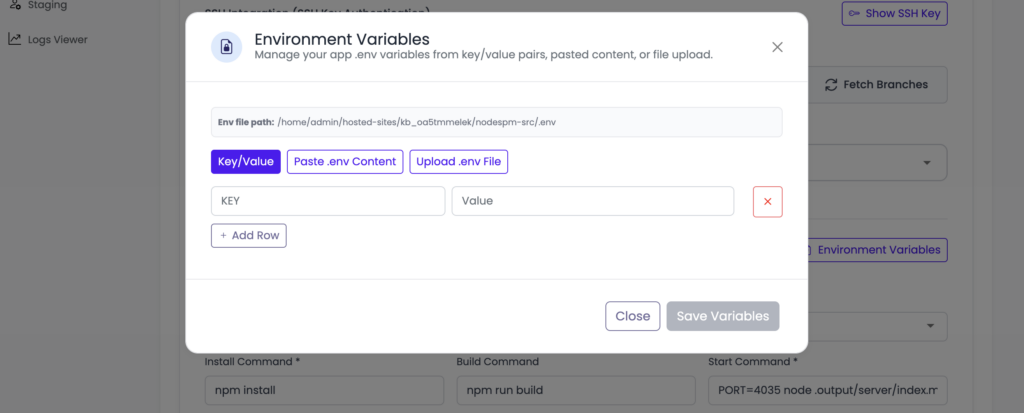
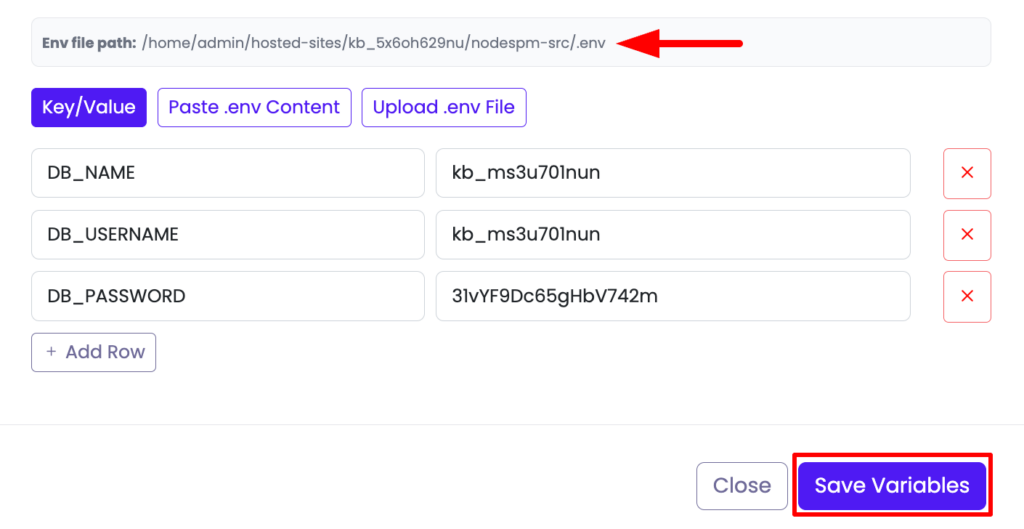
.env, convert to key/value, and save. The values live on the server, never in the repo.The platform stores them for the app and injects them at runtime, so your code’s process.env.MY_VAR (or the equivalent in your language) reads the right value. Because they live on the server rather than the repo, you can update or rotate a secret without touching your code or your Git history. One step people forget: after saving, redeploy so the app picks up the new values. And remember the earlier rule for anything with a public prefix. Those only take effect on the next build, not just a restart. If you’ve wired up auto-deploy from GitHub, a push does the rebuild for you.
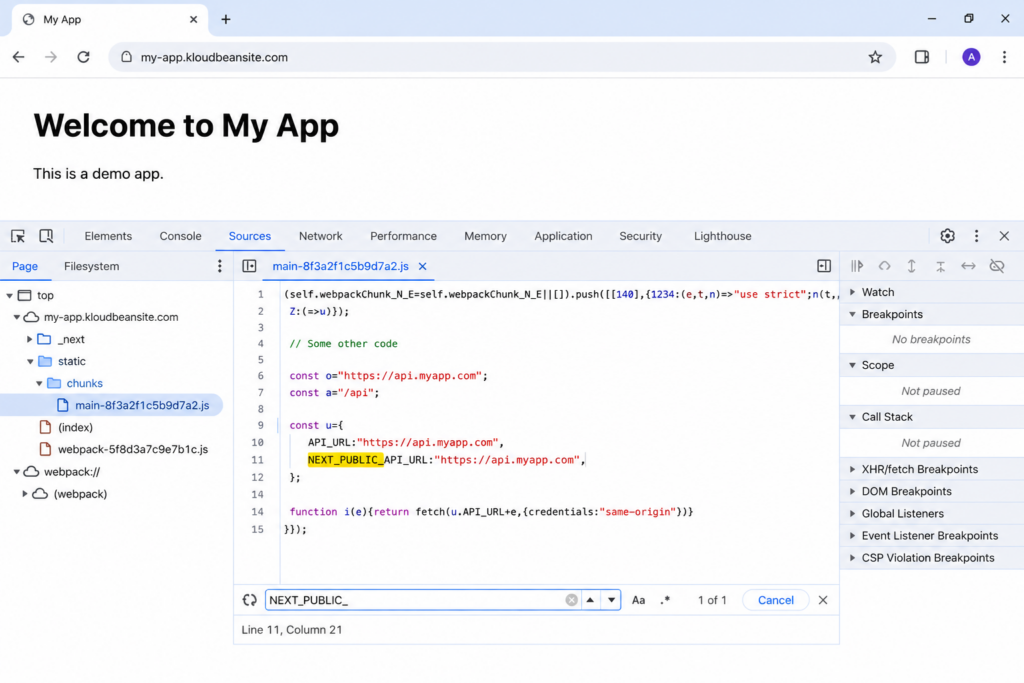
Browser dev tools, Sources tab, showing a NEXT_PUBLIC_ value sitting in plain text inside the shipped bundle.
When a missing variable 503s your app
The most common first-deploy failure has the simplest cause. The app starts, tries to read a variable that isn’t set on the server, and either throws immediately or falls over the first time it needs the value (a database connection with an undefined password, say). The process doesn’t stay up, so the server returns a 503. It builds fine, because the build didn’t need that runtime value. It just can’t boot.
Don’t guess which variable. Read the app’s own error log, which usually names the exact key it wanted:
/home/admin/hosted-sites/<app_system_user>/app-logs/app.error.log
Set the missing variable, redeploy, and the app comes up. The broader 503 playbook (missing env var, wrong start command, a build that skipped its tools) is in fixing a 503 after deploying. And when the missing value is a database URL, the clean setup is a managed database on the same server, so the connection string is a private-network address you paste in once.
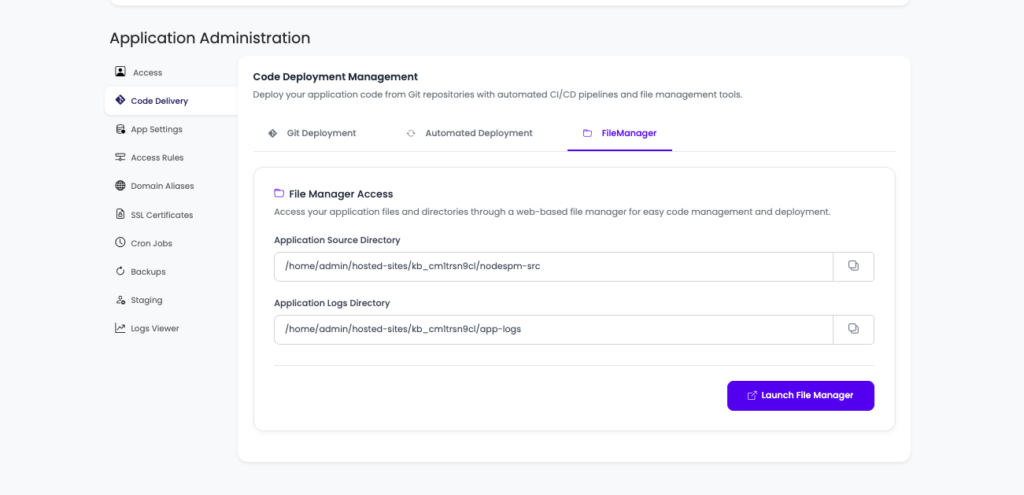
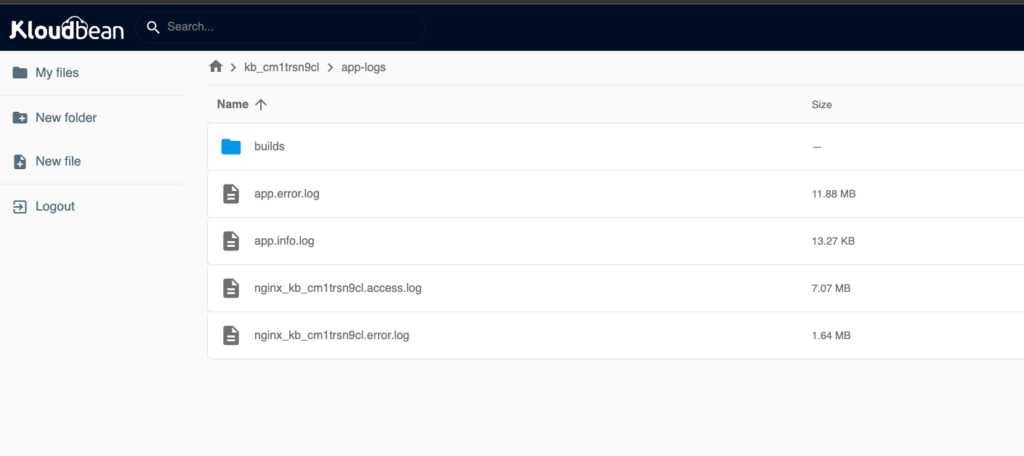
app.error.log open in the File Manager, with the line that names the exact missing environment variable highlighted.
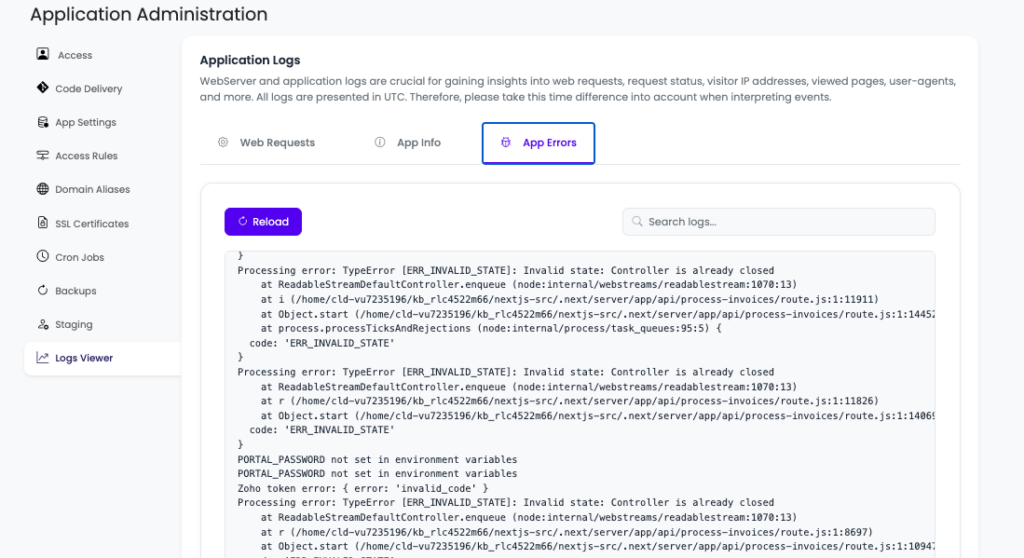
KloudBean provides two ways to access your application logs. The first is through the File Manager, where you can view complete historical log files, making it ideal for investigating older issues. However, in most cases you’ll want quick access to recent logs and errors. For that, KloudBean also displays your application’s latest logs directly in the dashboard, as shown in the screenshot below, so you can troubleshoot without browsing through log files.
Per-environment values. Running a staging app next to production? Give each its own variables: a staging database, staging keys, a different public URL. The same codebase then behaves correctly in each place because each environment supplies its own config, and your tests never touch production data. That separation is the entire reason environment variables exist. It pairs naturally with running your app, API, and database on one server.
The honest limits
On Kloudbean, environment variables are stored for your app and injected at runtime on your Linux server; you own the values and can update or rotate them anytime. Here’s the boundary worth stating: the platform handles storage and injection, but it can’t know which of your variables are secret and which are public. That judgment (the client-exposure discipline in this guide) is always yours to apply. It’s true on every host, because a prefix is a framework convention, not something a platform can police for you. Used well, this split is what makes an app safe to open-source and painless to run across environments. If you’re still getting the app onto a server, start with the deploy an AI-built app guide, then come back here to get the variables right.
Config outside the code. Secrets off the client.
Set your environment variables in the console at kloudbean.com, with a free trial and your first migration done for you. Wire up push-to-deploy next, and check server sizes on pricing.
FAQ
Where should environment variables go for a deployed app?
On the server, set through your host’s configuration. On Kloudbean that’s Runtime Configuration, Environment Variables, where you paste your .env and save. Never in your source code, and never committed to Git. The repo should be safe to expose without leaking anything.
What’s the difference between NEXT_PUBLIC_ variables and normal server env?
Prefixed variables (NEXT_PUBLIC_, VITE_, REACT_APP_) are baked into the front-end bundle at build time and visible in every visitor’s browser, so they’re for public values only. Unprefixed variables are read live by the server and stay private. Never put a secret in a prefixed variable, or you publish it to everyone.
I changed an environment variable and nothing happened. Why?
If it’s a build-time (prefixed) variable, its value was frozen into the bundle when you last built, so changing it does nothing until you rebuild. Set build-time variables before the build and rebuild after any change. Runtime variables only need a redeploy or restart to take effect.
Why does my app 503 right after deploying?
Most often a missing environment variable. The app starts, can’t find a value it needs (like the database password), and the process fails, so the server returns a 503. Read app.error.log; it usually names the missing key. Set it, then redeploy.
Should I commit my .env file?
No. Add it to .gitignore and set the values on the server instead. A committed .env leaks secrets into your Git history. If that has already happened, rotate the exposed keys, because deleting the file doesn’t remove them from history.
How do I rotate a secret?
Update the variable’s value on the server and redeploy. Because the secret lives in the environment rather than the code, rotation is a config change with no code edit. Quick to do, and worth doing routinely, especially if a key was ever exposed.
By Kloudbean · Managed multi-cloud hosting. Build. Deploy. Scale — Faster Than Ever.