For a few years now the default advice has been to spread a web app across services: the front end on an edge host, the API as serverless functions somewhere else, the database as a separate metered product in a third place. It works. It also means three dashboards, three bills, three things to keep in your head, and a trip across the public internet between every layer. For a huge number of apps, especially the ones coming out of Lovable, Bolt, or Cursor, there’s a simpler shape that’s faster and cheaper to run: put your app, API, and database on one server you own. This is the case for that architecture, why the co-located version is quicker where it counts, and exactly how to build it.
Running the full stack on one server means your app reaches its database over the machine’s local network, in under a millisecond, instead of a round trip across the internet to a hosted service. You get one bill, one thing to back up, one place to debug, and a database that never has to face the public internet. Split things apart later, deliberately, when real scale or separate teams make you. For most apps, one box is the right default, not a compromise.
Two shapes for the same app
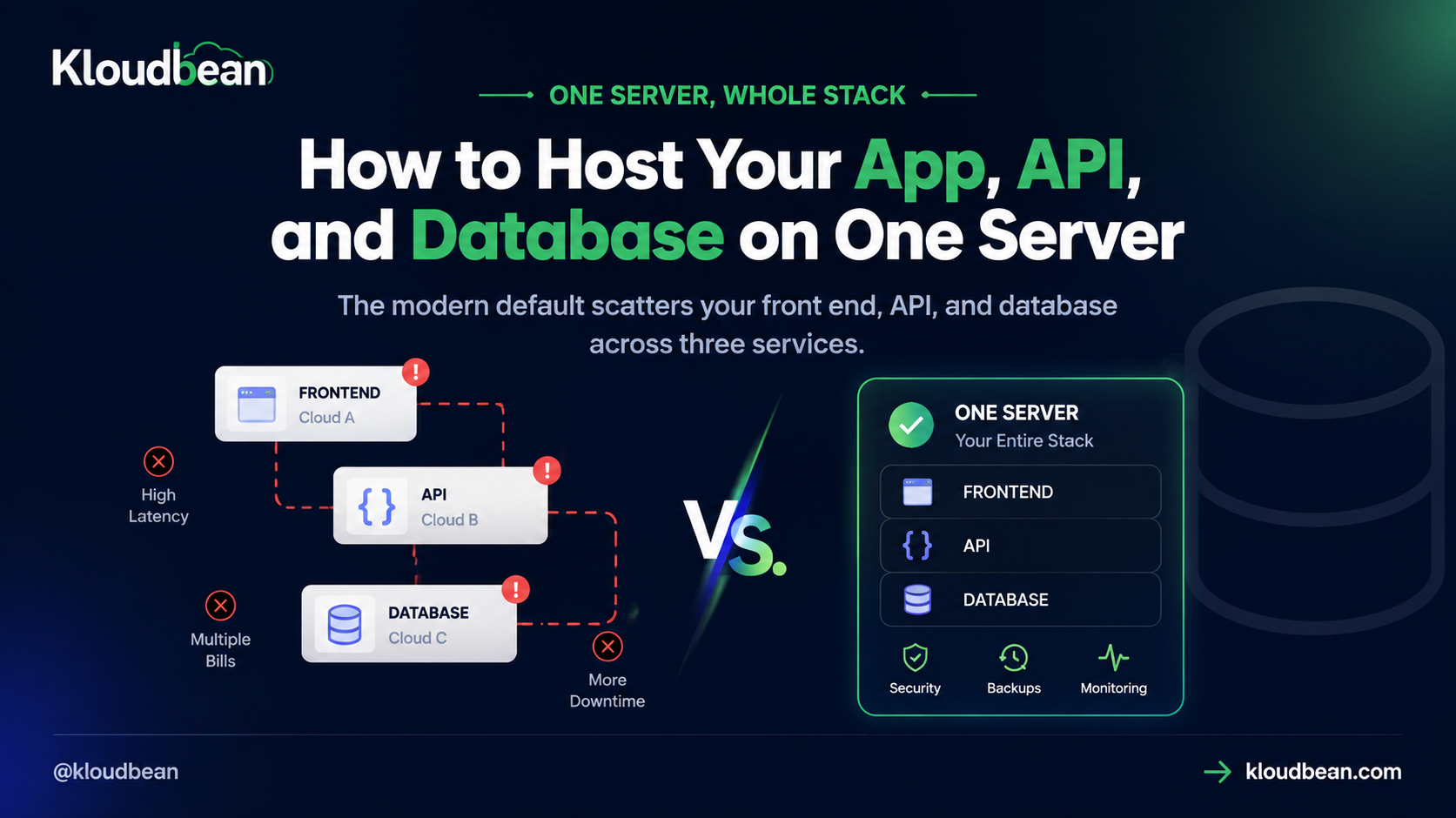
Before the how, look at the what. Here’s the same app drawn two ways: everything co-located on one server, versus the scattered default where each layer lives in a different cloud. The thing to watch is the arrows. On the left they’re short hops across a local network. On the right, every one of them is a round trip over the public internet.
Why put the app, API, and database on one server?
Because for most apps the co-located shape wins on the things you actually feel, and loses on almost nothing until you’re genuinely big. Here’s the honest ledger:
- The database is a local call, not an internet call. Your app reaches Postgres or MySQL over the machine’s own network in a fraction of a millisecond. A data-heavy page that makes a handful of queries feels the difference immediately.
- One predictable bill. You pay for a server, not a front-end plan plus function invocations plus a database tier that each meter separately and climb on their own schedule.
- One place to debug. When something breaks, you look at one server, its logs, its processes, its database, instead of triangulating across three services and guessing which one dropped the request.
- App and data backed up together. The whole stack sits on infrastructure you own and gets backed up as a unit, so a restore brings back a coherent snapshot, not three services that have drifted out of sync.
- A smaller attack surface. The database never needs a public door, because the only thing that talks to it is the app on the same box.
I’ll take a position here, because the industry rarely does. Most apps don’t have Google’s problems, and copying Google’s architecture mostly gives you Google’s operational overhead without Google’s scale. A single-server architecture that hosts the frontend, backend, and database together is the right default for the large middle of real-world apps. The scattered version is a scaling tool you reach for when you have a scaling problem, not a starting point.
The distance your data actually travels
This is the part the scattered setup handles worst, so it’s worth slowing down on. When your database is a separate hosted service, every query leaves your app, crosses the public internet, hits the database, and comes back. That round trip adds real latency to anything data-driven, and it stacks: a page that runs six queries pays that internet tax six times. When the database sits on the same server, the trip is over the machine’s local loopback, effectively instant.
You can see the whole difference in one environment variable. It’s the host in your connection string:
# scattered: every query crosses the internet
DATABASE_URL="postgresql://user:[email protected]:5432/app"

# co-located: same box, over the local network
DATABASE_URL="postgresql://user:[email protected]:5432/app"
Same app, same query, radically different physics. Pointing at 127.0.0.1 instead of a hostname three networks away is the single least glamorous performance win available, and you get it for free just by not scattering the pieces. Keeping that connection string out of your code and in the environment is its own small discipline, covered in environment variables done right.
What one-server architecture actually looks like
Make it concrete with the shape most vibe-coded apps already have: a React front end, an Express or Next.js API, and a Postgres database. On one server, that’s a single Node process serving the built front-end files and answering the /api/... routes, plus a Postgres instance on the same machine that the process connects to through a DATABASE_URL pointed at localhost. A visitor loads the page (served by your process), the page calls /api/things (handled by the same process), which queries Postgres (right there on the box) and returns the data. Everything a request touches lives on one machine. That’s the full stack on one server, and for this extremely common app shape it isn’t a lesser architecture. It’s the cleaner one.
Front end and API: one process or two?
A real design choice, and both answers are fine on one server:
- One process (a monolith). Your app serves the front end and the API from the same Node process: an Express server that both hands out the built front-end files and handles
/api/..., or a Next.js app doing both. Simplest possible shape, one thing to deploy and run. Many vibe-coded apps come out exactly like this, and it’s a perfectly good production form. - Two applications on the same server. Prefer to keep the front end and API as separate deployables? Run them as two applications on the same box, each with its own Start command, sharing the server and the database. More separation, still one bill.
Neither is more correct. Start with whatever your app already is, usually the single process, and split it only when you have a concrete reason. One server holds both arrangements without dragging in extra services.
Where people get this wrong
Two mistakes show up again and again. The first is architectural cargo-culting: scattering a brand-new, low-traffic app across three clouds because a conference talk about a company 10,000 times its size did it that way. You inherit all the coordination cost and none of the reason for it. If you can’t name the specific scaling problem the split solves for you, you probably don’t have it yet.
The second is a security one we see constantly: an app and its database on the same server, but the database still configured to accept connections from anywhere on the internet. If the only client is the app on the same box, the database doesn’t need a public door at all. Bind it to the local interface, keep it off the public internet, and you’ve closed a whole category of exposure for free. Co-location makes that easy; leaving the door open throws the benefit away.
The ops win, in one breath
Set the latency aside for a second, because the operational story might matter more day to day. One server means one firewall to configure, one set of logs to read, one backup to restore, one invoice to reconcile, and one system to reason about when you ask “what’s exposed, and to whom.” The scattered version multiplies each of those by three and then adds the connections between them. Every vendor is another status page to watch and another billing relationship to manage. Consolidating doesn’t just save money. It shrinks the number of things that can independently ruin your afternoon.
When you should split it apart
Being honest about the limits is the point, so here’s when one server stops being the answer. You split deliberately, driven by a metric, not a vibe:
- The database is starved. If the app and the database are fighting over the same CPU and memory, move the database onto its own server so it gets dedicated resources. Your connection string changes; your code doesn’t.
- One box can’t take the traffic. Put a load balancer in front and run the app on more than one instance. Kloudbean’s Flexible Load Balancer is built in for exactly this, and the load balancer explainer covers when it earns its place.
- Reads dominate. A read-heavy app can add read replicas before it needs a full re-architecture; the read-replicas guide walks through that.
- Separate teams or a global audience. Genuinely independent teams, or users spread across continents who need edge presence, are real reasons to distribute. Not day-one reasons for most apps.
Starting on one server doesn’t paint you into a corner. Because it’s standard Linux and standard code, splitting a component out later is a normal operation, not a rewrite. Begin simple, scale when the need is real.
How to set it up on Kloudbean
The setup is the ordinary deploy flow, with the database landing on the same box instead of a separate service:
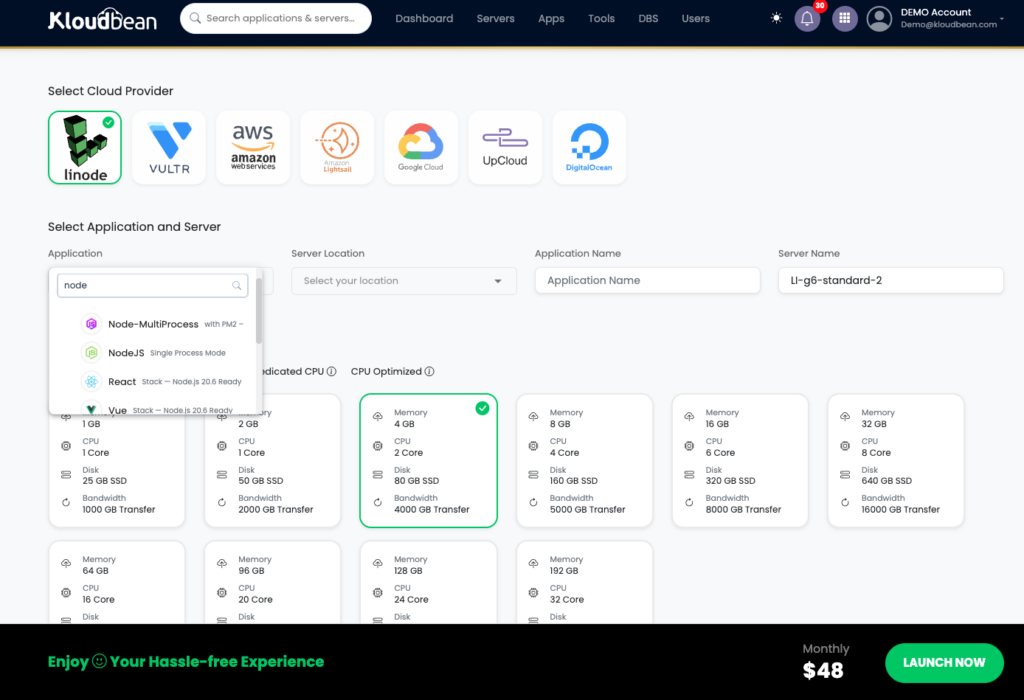
- Launch a server. Pick one of the cloud providers, choose your stack (Node, or whatever you run), and the nearest datacenter. Give it enough memory to build.
- Deploy the app. Open Application Administration → Deploy Code, connect your Git repo, set the app directory,
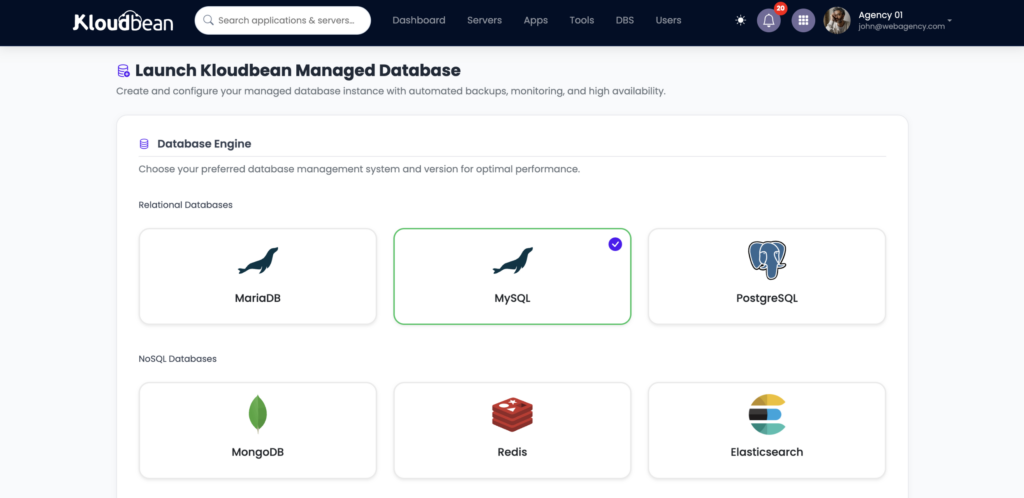
process.env.PORT, and your install, build, and start commands, then Pull & Deploy. - Launch the database on the same box. From DBS → Launch Database, create a managed instance. You’ve got six engines to choose from (Postgres, MySQL, MariaDB, MongoDB, Redis, Elasticsearch), all living on the server you just deployed to.
- Wire it with an environment variable. In Runtime Configuration → Environment Variables, set
DATABASE_URLto point at the local database. Never hard-code it. - Point your domain, add SSL, turn on auto-deploy. Attach your domain with a free Let’s Encrypt certificate and enable automated deployment so every push ships. The auto-deploy guide has that part.
That’s the whole stack, front end, API, and data, on one server you own, reachable at your domain over HTTPS. If you want the app side in more detail, the deploy an AI-built app guide and the add a managed database guide cover each half.
How this differs from splitting the front end from the API
One clarification, because people mix these up. Deciding whether your React front end and your API run as one process or two is a question about how you serve the app. Deciding to keep the app and the database on one server is a question about where your data lives and how far it travels. They’re different axes. You can run a single-process monolith or two apps, and in both cases keep the database local. The topology guide for the serving side is the full-stack React deploy guide; this piece is about co-locating the data so queries stay on the machine. And if the “several apps on one server” idea appeals, hosting multiple apps on one server takes it further.
What stays managed
Running the whole stack on one server doesn’t mean running the server by hand. The managed platform handles the OS, the web stack, the process manager that keeps your app alive, SSL, and backups, including the database. You own the application and the data; the platform keeps the box healthy. That split is what makes “everything on one server” practical for people who’d rather build than administer Linux. You get the simplicity and ownership of a single machine without inheriting the grind of a bare one.
The honest limits
Kloudbean runs Linux web stacks (Node, PHP, Python, and frameworks like React, Next.js, Vue, Laravel, and Django) with managed databases under same dashboard. Two honest points about the architecture itself. First, one server is, until you scale, a single point of failure, which is exactly why managed backups matter and why you add a load balancer or move the database out when uptime demands it. Second, “one server” is the right default for most apps but not all; a genuinely global, latency-critical, or very high-traffic app will eventually want a distributed setup. For the large middle of real apps, one owned box holding the whole stack is the simplest thing that fully works.
A simpler way to run the stack
Keep the architecture simple. Let the infrastructure handle itself.
Run your app, API, and database together on one managed server without taking on the day-to-day work of maintaining the machine yourself. Deploy from Git, keep your database private, and have backups, SSL, and the rest of the server stack handled in the same environment. Explore KloudBean or see available server options on pricing.
Explore KloudBean →FAQ
Can I run my front end, API, and database on one server?
Yes, and for most apps it’s the simplest good architecture. The app (serving the front end and API) runs as an always-on process, and a managed database such as Postgres or MySQL runs on the same server, connected over the local network. One box holds the whole stack.
Isn’t it better to use separate services for each layer?
Only at large scale or for specific needs like a global audience or independent teams. For the typical app, one server is simpler, cheaper, faster to the database, and easier to debug than scattering the front end, API, and database across three separate metered services.
Why is keeping the database on the same server faster?
Your app reaches it over the machine’s local network in a fraction of a millisecond, instead of a round trip across the public internet to a hosted database. For data-heavy apps that’s a real, free performance win, and the database never needs to be exposed publicly.
Should the front end and API be one process or two?
Either works on one server. Many apps run a single process that serves both the front end and the API routes; if you prefer separation, run them as two applications on the same server sharing the database. Start with whatever your app already is.
Is one server a single point of failure?
Until you scale, yes, which is why managed backups matter and why you add a load balancer or move the database to its own server when uptime demands it. Starting on one server is fine and doesn’t lock you in; you split components out later if real traffic requires it.
How do I move the database off later without a rewrite?
You launch a database on its own server and change the connection string in your environment variables to point at it. Because it’s standard Linux and standard code, your application doesn’t change; only the host in DATABASE_URL does. That’s what makes starting on one server safe.
By Kloudbean · Managed multi-cloud hosting. Build. Deploy. Scale. Faster Than Ever.