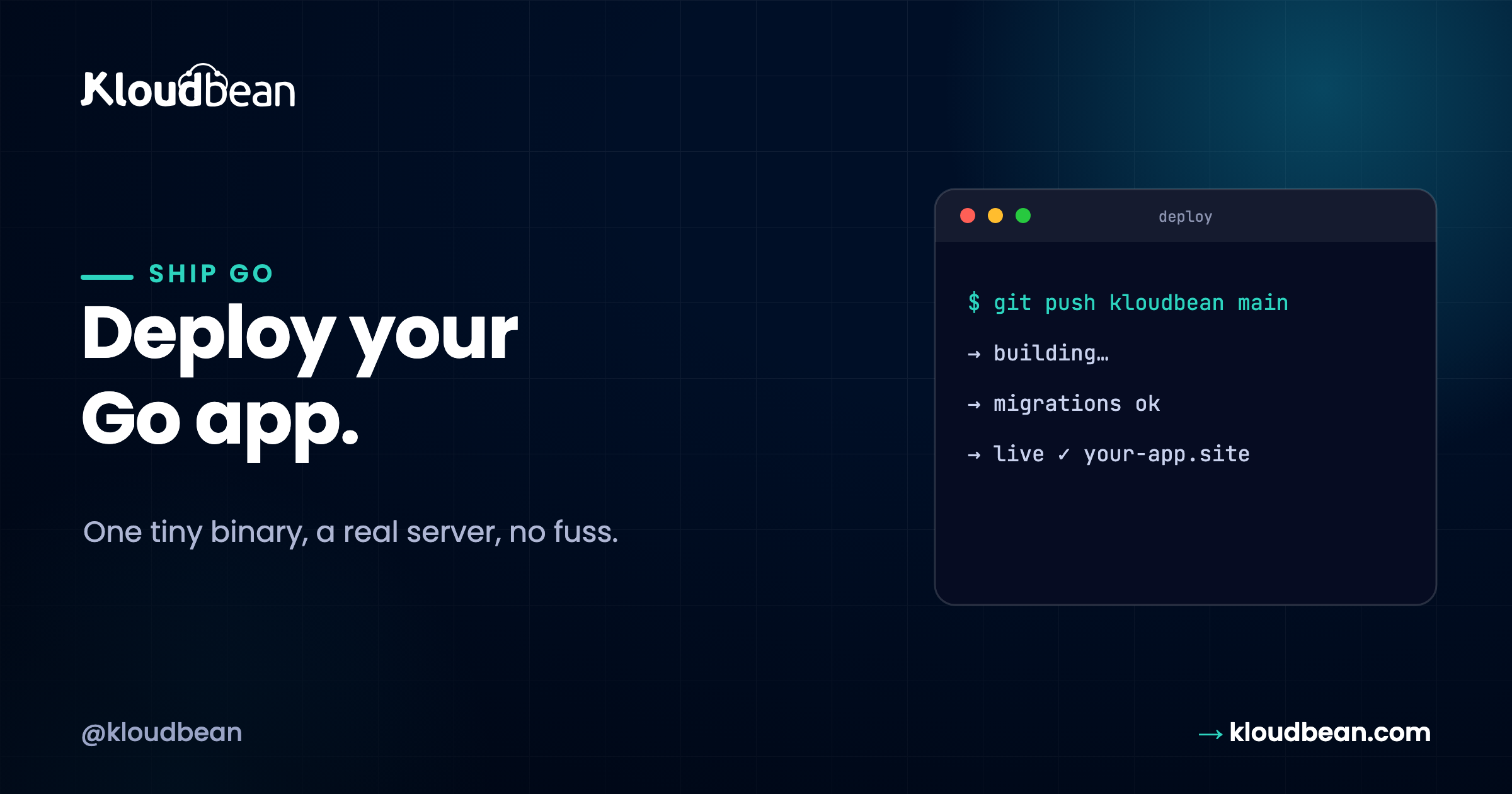
To deploy a Node or Python app you ship code, plus a runtime, plus a folder of dependencies, and hope the versions line up. To deploy a Golang app you ship a file. One file. That single difference is why deploying Go is the most anticlimactic deploy in this whole series, in the best way.
The problem isn’t that Go is complicated to deploy. The problem is that most developers treat “simple to deploy” as “optional ops work you handle yourself.” It isn’t. Let’s walk through what deployment actually requires, why you’d want to skip that whole layer, and how that changes the game.
Short version
Compile with go build -o app and you get one self-contained binary, no runtime to install. Put it on a managed Linux server and run it undersystemdso it stays up and restarts on reboot. Read the port from os.Getenv("PORT"), put a reverse proxy in front for your domain and SSL, and run a managed Postgres or MySQL alongside. This is the server-based path, not a one-click Go runtime, and Go doesn’t need one.
What go build actually hands you
When you compile a Go program, the compiler packs everything – your code and every dependency – into a single self-contained binary. There’s no interpreter to install on the server. No node_modules to restore, no virtualenv to recreate. No “which version is the server running?” because the answer is: none, the binary carries what it needs. That one executable is your application.
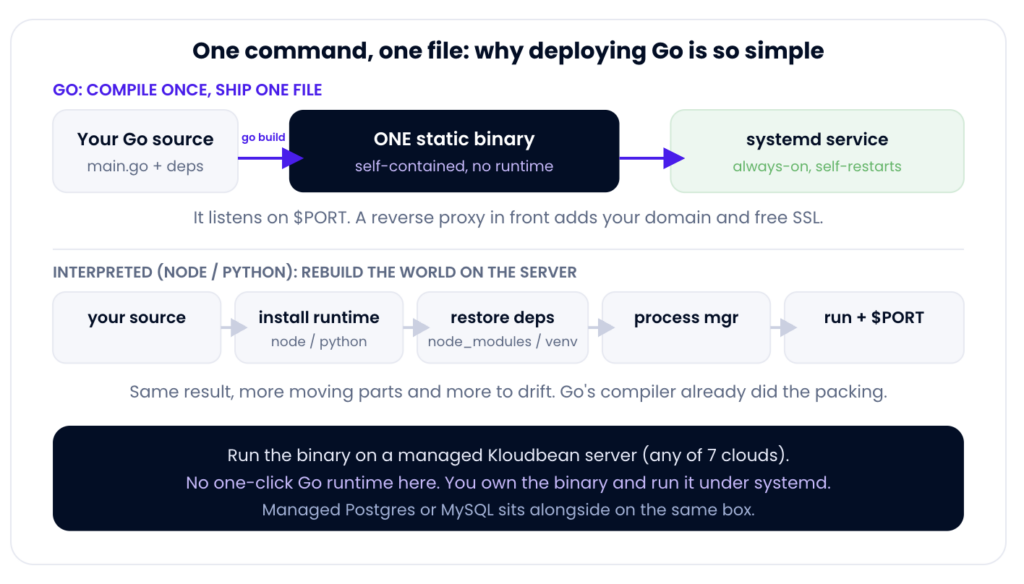
This is the fundamental difference that makes Go deployment simpler than other languages. Everything else flows from this fact.
How you deploy a Golang app on a server you own
Your binary is ready. Now you need it running on a server, staying alive, restarting if it crashes, and actually reachable to users. Here’s what the infrastructure has to provide:
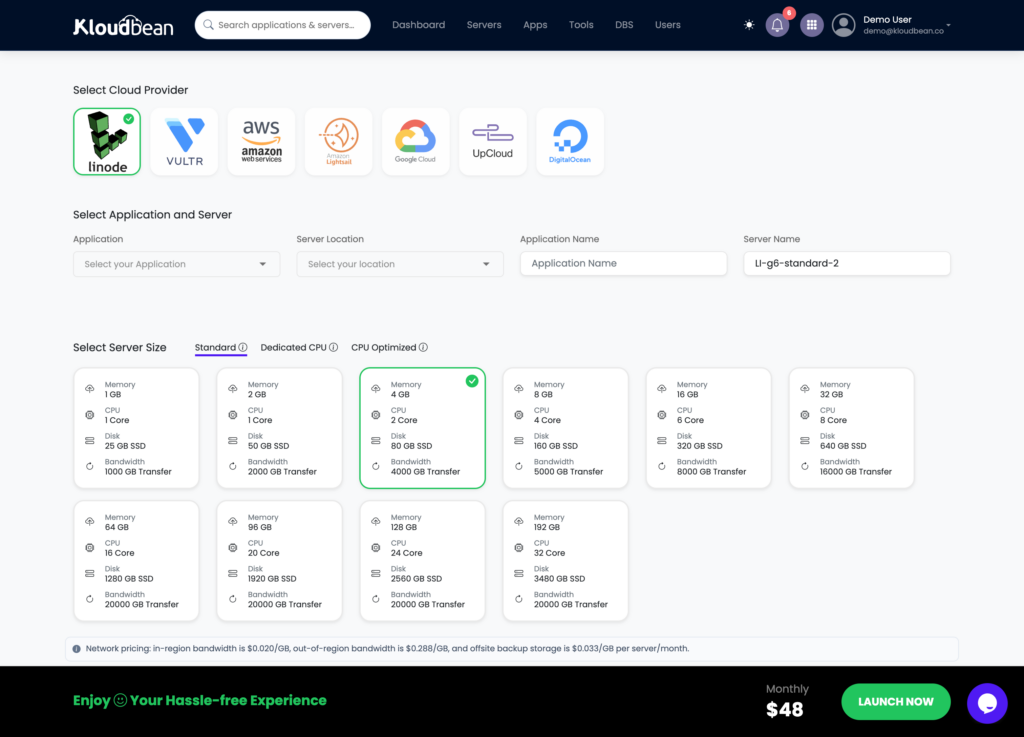
Add Server: spin up a managed Linux server on any of the seven clouds. That’s the box your Go binary runs on.
The layers you need
A Linux server. Your binary runs on Linux. This is your machine, someone’s responsibility to patch, secure, monitor, and keep running.
A process manager. Your app can’t just run in an SSH terminal. It needs to start on boot, restart if it crashes, and stay running forever. systemd is the standard on modern Linux – it’s built in, well-documented, and proven.
A reverse proxy. Your app listens on port 8080. Users visit yourapp.com on port 80/443. You need nginx (or similar) in the middle translating requests, handling SSL, and adding security headers.
SSL/TLS certificates. HTTPS is mandatory now. Let’s Encrypt provides free certificates. The hard part isn’t getting the cert – it’s automating renewal before expiration. This requires monitoring, automation, and actually remembering to test that renewal works.
Database backups. If your app stores data, regular backups are non-negotiable. When something breaks (and it will), a restore is the difference between a fix and a catastrophe. This requires automation, monitoring, and testing that restores actually work.
OS maintenance. Security patches come out constantly. Your Linux box needs them applied. Regularly. Without downtime if possible.
What it looks like in practice
A systemd unit file for your Go app:

[Unit]
Description=My Go App
After=network.target

[Service]
Type=simple
User=go-app
ExecStart=/opt/app/myapp
Restart=always
RestartSec=10
Environment="PORT=8080"
Environment="DATABASE_URL=postgres://..."

[Install]
WantedBy=multi-user.target
An nginx config routing traffic:

upstream app {
server localhost:8080;
}

server {
listen 80;
server_name yourapp.com;
return 301 https://$server_name$request_uri;
}

server {
listen 443 ssl http2;
server_name yourapp.com;

ssl_certificate /etc/letsencrypt/live/yourapp.com/fullchain.pem;
ssl_certificate_key /etc/letsencrypt/live/yourapp.com/privkey.pem;

location / {
proxy_pass http://app;
proxy_set_header Host $host;
proxy_set_header X-Real-IP $remote_addr;
}
}
That’s the entire “build and run.” No dependency install that can fail, no runtime version to match, no cold-start warmup. The binary starts fast and stays small. What’s left is doing the “run it” part properly so it survives a logout and a reboot, which is the next section.Add imageA terminal showing go build finishing, then ls -lh app with the single compiled binary and its size.The “it’s just one file” payoff, made visible.
The one rule your code must follow: read the port
The single thing your Go code has to do to deploy cleanly is read its port from the environment instead of hard-coding one. The server (or the reverse proxy in front) decides which port your app should listen on, and it tells you through an env var.
port := os.Getenv("PORT")
if port == "" {
    port = "8080"   // sensible local default
}
log.Fatal(http.ListenAndServe(":"+port, nil))
Hard-code :3000 and the thing in front goes looking on the port it assigned, finds nothing, and you get a 502 or 503. This is the most common reason a Go deploy doesn’t answer on the first try. Honestly, on a pure-Go app, it’s about the only common one. If you do hit a blank 503, the walkthrough is fixing a 503 after deploying your app.
This isn’t magic. But it’s also not trivial. You need to understand each line, get the paths and permissions right, handle certificate renewal automation, test that backups restore, monitor whether it’s running, and manage OS-level security updates. Every single one of these things is something you have to think about and get right.
Keeping it alive: systemd, not a terminal
Here’s where people actually get a Go deploy wrong, and it’s got nothing to do with Go. Someone SSHes into the server, runs ./app, sees it responding, and closes the laptop. The process was a child of that SSH session, so it dies the moment the session ends. Or the server reboots for a kernel update at 3am and the app never comes back, because nothing was ever told to start it again. Running nohup ./app & is a half-step: it survives logout, but it still won’t restart after a crash or a reboot.
The fix is a process supervisor, and on a Linux server that’s systemd. (Not PM2, which is a Node tool. Not a fancy orchestrator. Just the init system that’s already on the box.) You write a small unit file that says “run this binary, keep it alive, start it on boot”:
# /etc/systemd/system/myapp.service
[Unit]
Description=My Go app
After=network.target

[Service]
Type=simple
User=appuser
WorkingDirectory=/home/appuser/myapp
ExecStart=/home/appuser/myapp/app
EnvironmentFile=/home/appuser/myapp/.env
Restart=always
RestartSec=3

[Install]
WantedBy=multi-user.target
sudo systemctl daemon-reload
sudo systemctl enable --now myapp     # start now, and on every boot
sudo systemctl status myapp           # is it running?
Now the binary starts on boot, restarts within seconds if it ever exits, and logs go to the journal where journalctl -u myapp can read them. That’s what “always-on” actually means. On a managed server the box itself, its patching and the firewall are handled for you, so this unit file is about the only server-level thing you write.Add imageA terminal showing systemctl status myapp with an active (running) service, or a journalctl -u myapp tail with the app logging its start on the assigned port.Makes “the binary is supervised, not just running” concrete.
The hidden cost: repeated work
Here’s where most deployment guides fail. They show you the setup once. They don’t talk about what happens next.
Version 2.0. You’ve fixed bugs, added features, compiled a new binary. Now:
- SSH to the server
- Stop the systemd service
- Copy the new binary over (careful not to overwrite the old one, you might need to rollback)
- Start systemd
- Check logs to see if it worked
- If broken, kill it, restore the old binary, restart, hope you didn’t lose data
This takes 5-10 minutes every time. You’re repeating the exact same mechanical steps. Version 20? You’ve spent 2+ hours on repetitive deployment work that adds zero value to your application.
OS updates. Security patches come out. You ssh in, apply them, test that your app still works, cross your fingers that nothing broke. Repeat monthly.
Certificate renewal. Let’s Encrypt certs expire every 90 days. You need to monitor renewal, verify it worked, set up alerts if it fails. Forget this once and your app goes down.
Database backups. You set up a schedule, run backups, store them somewhere, test that they restore. This isn’t one-time work – it’s ongoing monitoring and verification.
The setup is simple. The maintenance is the grind.
Your domain and SSL: a reverse proxy in front
Your binary speaks plain HTTP on some internal port. To serve it on your domain over HTTPS, you put a web server in front as a reverse proxy: it terminates TLS, handles the certificate, and forwards requests to your app’s port. On a managed server that reverse proxy and a free Let’s Encrypt certificate are part of the setup, so you point your domain at the server, and the proxy talks to your binary. You don’t hand-assemble the TLS story. Good, because certificate renewal is exactly the kind of thing you want off your plate.
The database, if your app is stateful
Go is just the client here, same as any language. If your app stores data, launch a managed database and connect over the local network with a connection string in an env var. Postgres and MySQL are both a click to create and backed up for you.
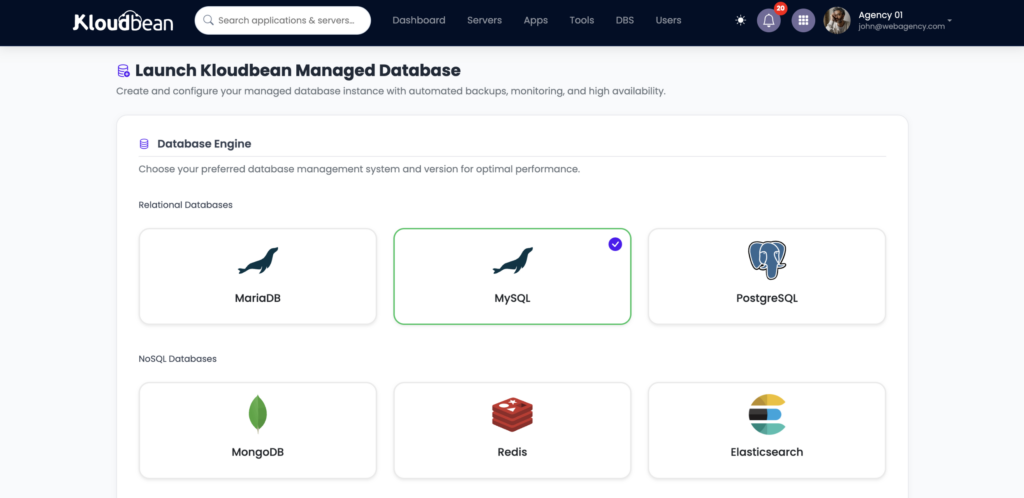
Launch Database: a managed Postgres (or MySQL) on the same box, reached over the local network and backed up for you.
Feed the connection string in as an environment variable, exactly like PORT. Keep it out of the binary and out of git. The reasoning is in environment variables, done right, and the details of the managed engines are in managed PostgreSQL hosting and managed MySQL hosting. Running the binary and its database on one server is the pattern in host your app, API, and database on one server.
# the app's environment (loaded by systemd via EnvironmentFile)
PORT=8080
DATABASE_URL=postgres://myapp:[email protected]:5432/myapp
The one gotcha: build a Linux binary
Because Go compiles for a specific operating system, there’s one thing to get right. The binary that runs in production has to be a Linux binary, because that’s what the server is. Two clean ways to handle it:
- Build on the server. Pull your code, run
go buildright there, and the binary is automatically for the server’s OS. Simplest. - Cross-compile, then copy it over. Build a Linux binary from your Mac or Windows machine and ship the file.
# cross-compile a Linux binary from any machine, then copy it up
GOOS=linux GOARCH=amd64 go build -o app .
scp app appuser@your-server:/home/appuser/myapp/
One footnote: if your app uses CGO (say, a SQLite driver that links C), the build needs the C toolchain and a matching target, so building on the server is the easy path. Most pure-Go apps never touch this.
Why other approaches don’t fit
Docker and Kubernetes
Some people containerize Go apps for deployment. This solves a problem Go doesn’t have. Docker is useful if you’re already running containerized infrastructure at scale, or if you need to run the same image across multiple platforms. For a single Go binary on a server? Docker adds complexity without solving anything.
Kubernetes is even more overkill. It’s built for large-scale orchestration. If you’re running one or even five Go services, Kubernetes is 90% overhead that you don’t need.
Serverless
AWS Lambda and similar services are great for event-driven workloads – webhooks, scheduled jobs, bursty traffic. But for a web app that needs to stay running constantly, serverless doesn’t make sense. Cold start latency (your function spinning up from nothing) kills performance. Execution time limits make long-running processes awkward. Go’s efficiency advantage disappears when you’re paying per-invocation instead of per-server.
DIY on cheap cloud
Yes, you can rent a $5/month DigitalOcean droplet and do all this yourself. You’ll save money on compute. You’ll lose it on your time. Every deployment, every maintenance task, every update is your problem. For a solo project with no revenue, maybe that math works. For anything else, your time is worth more than $7/month.
Why KloudBean’s model actually makes sense
Here’s what changes when deployment is one click:
Deployment 1.0: Compile, upload binary, click deploy. Done. SSL is already on. systemd is already configured. nginx is already routing traffic. Backups are already scheduled. Takes 30 seconds.
Deployment 2.0, 3.0, 20.0: Same 30 seconds. Upload binary, click deploy. No SSH, no manual systemd restart, no verification dance. Deployments are tracked, so rollback is one click if something breaks.
OS updates: We handle them. You don’t think about it.
Certificate renewal: Automatic. We monitor it, renew it, verify it worked. You never think about it.
Database backups: Automatic. Encrypted, stored safely, tested regularly. You can trigger a restore from the dashboard if something breaks.
The math changes: instead of 2 hours per year on repetitive deployment work, you spend zero. That time goes back to building your app. At $12/month, that’s undeniable value.
And this isn’t just “convenience.” It’s structure. Everything is configured correctly from the start. You don’t have to understand systemd, nginx configs, SSL renewal automation, or database backup strategies. You just upload a binary and it works.
Why this makes Go cheap to run
Whatever you choose, Go has an advantage: efficiency.
A Go binary is small (often 5-20MB) and starts fast (milliseconds). It doesn’t need much memory – a typical Go web app runs on 256MB RAM. It doesn’t need runtime overhead. Multiple small Go services can share one box without friction.
Compare this to Node: Node runtime is 100MB+ on disk, plus node_modules folder (often hundreds of MB), plus runtime memory overhead. A Python app is similar. Go just ships one binary.
On cost: a Go app on KloudBean’s $8/month box often handles traffic that would need a $30+ box running Node or Python. That efficiency compounds. Over a year, Go saves you hundreds of dollars.
Rollback is just the previous binary
One more perk of the single-file model. A deploy is “build this commit into a file and run it,” so rolling back is “run the previous file.” No dependency graph to unwind, no half-migrated runtime. If a release misbehaves, you swap the binary back and restart the service, and you’re where you were. Keep the last known-good binary around and rollback is a ten-second systemctl restart.
The honest bit
None of this is magic. It’s what a compiled language gives you. Kloudbean runs the Linux server, its patching, the firewall, the reverse proxy and SSL, and server-level backups; you own the binary, its config, and its data. Go is a first-class Linux citizen, so there’s nothing to fight. To say it once more plainly: this is the server-based path, running your compiled binary on a managed server under systemd, not a push-button “Go” runtime, and a self-contained binary is exactly the thing that doesn’t need one. Coming from a runtime-managed stack instead? The contrast is deploy a Node app to managed cloud. For the Go app itself, the deploy really is close to boring. Boring is the goal.
One binary. One server. Live.
Run your Go binary on a server you own at kloudbean.com. Managed Postgres & MySQL · Automatic backups · Free Let’s Encrypt SSL · Private networking · Free migration · Free trial. A small box goes a long way with Go. Sizes on pricing.
FAQ
How do I deploy a Go app to production?
Compile it with go build -o app, then: put the binary on a Linux server and run it under systemd so it stays up and restarts on reboot. Set up nginx in front for your domain and SSL. Connect a database if your app is stateful. Set up regular backups. Keep the OS patched. If you do this yourself, it’s learnable. If you use KloudBean, upload the binary and click deploy – we handle everything else.
Do I need Docker to deploy a Go app?
No. A static Go binary has no runtime dependencies – there’s nothing Docker buys you. Docker is useful if you’re already running containerized infrastructure, or if you need to run the same image across multiple platforms. For a single Go app on one server, systemd is simpler and better.
What if I want to manage the server myself?
You can. Rent a Linux box from DigitalOcean, Linode, AWS, or Vultr. SSH in, write your systemd unit file, set up nginx, configure Let’s Encrypt SSL renewal, set up database backups, keep the OS patched. It works, it’s learnable, and it costs $5-30/month. The tradeoff is you own the entire ops stack – every deploy, every update, every maintenance task is your responsibility.
Why would I use KloudBean instead of DIY?
Because your time is worth more than $7/month. Every deploy, update, and maintenance task you handle yourself adds up. After 20 deploys, you’ve spent 2+ hours on repetitive work that adds nothing to your app. KloudBean automates that – SSL renewal, OS patches, backups, deployments, everything. You upload a binary and click deploy. That’s it.
Why won’t my Go app come up after deploying?
Most likely because it isn’t listening on the assigned port. Read the port from os.Getenv("PORT") instead of hard-coding 8080. On KloudBean, make sure you specified the port when you set up the app. The reverse proxy needs to know where to send traffic.
How do I keep a Go binary running after I log out?
Use systemd as a process manager. A unit file with Restart=always and WantedBy=multi-user.target ensures your binary starts on boot and restarts if it crashes. Running it in a terminal or with nohup won’t survive a crash or reboot.
Do I need to install Go on the server?
Only if you’re building there. If you cross-compile locally to a Linux binary with GOOS=linux go build and copy it to the server, Go doesn’t need to be installed – just your binary runs. If your app uses CGO (like certain SQLite bindings), build on the server so C libraries match.
How much server does a Go app need?
Usually not much. Go is efficient – small memory footprint, fast startup. A single-core box with 512MB-1GB RAM handles most Go apps fine. Multiple small Go services share one box without friction. Start small and only resize when traffic or workload actually demands it.
What about the “build for Linux” issue?
Your binary must target Linux (the server OS). Build locally with GOOS=linux GOARCH=amd64 go build and copy to the server. Or build on the server directly. If your app uses CGO (C dependencies), build on the server to ensure C libraries are compatible.
Can I export my data and leave KloudBean?
Yes. Your database is yours – export it anytime as a SQL dump or whatever format you need. Your binary is yours – download it or deploy elsewhere. You can take everything to another provider or your own server. You’re never locked in.
Kloudbean · One binary, none of the drama.