Cheap VPS: a few dollars a month. Managed plan: several times that, for what looks like the exact same box. So why would anyone pay more?
Because managed vs unmanaged hosting isn’t two prices for one product. It’s two different jobs, and only one of them lands on your desk. On an unmanaged server you’re the sysadmin. On a managed one, someone else is. That single fact explains the price gap, the marketing pages, and most of the regret people feel three months in when a cert expires on a Sunday. Let’s split it apart honestly, so you buy the job you actually want instead of the number that looked good.
Short answer
Unmanaged hosting rents you a raw server and hands you every operations task on it: patching, SSL, firewall, backups, monitoring, and the 2am pager. Managed hosting runs all of that for you on the same class of machine, so you touch your app, not the OS. Cheap on the invoice and expensive in your hours, versus a higher invoice that buys those hours (and the risk) back. Choose based on whose problem the server should be.
So what is managed vs unmanaged hosting, really?
Forget feature lists for a second. There’s one question underneath all of it: who runs the server?
Unmanaged means you get a virtual machine, an operating system, and an IP address. That’s the whole delivery. Everything above the bare OS is your job. You install the web server and the runtime, you configure the firewall, you issue and renew SSL, you patch the kernel, you arrange backups, and you’re the one who wakes up when it falls over. You’re renting compute, and only compute.
Managed means the same underlying machine, but the operating work is done for you. The platform installs and maintains the stack, keeps the OS patched, sets up and renews SSL, runs backups, and watches the server’s health. You interact with your application. The Linux box underneath still exists, you just don’t have to babysit it.
The responsibility split, in one picture
Here’s the whole argument as a diagram. Same stack, top to bottom. The only thing that changes between the two columns is who owns each layer.
Unmanaged shades almost the whole stack purple: that’s you. Managed flips those layers to the platform. Either way, the green stays yours.
Who does what: the full breakdown
The diagram in words, task by task. Same server underneath both columns. What differs is the name next to each chore.
| Task | Unmanaged (on you) | Managed (on the platform) |
|---|---|---|
| Provision + harden the OS | You spin it up, lock it down | Launched and hardened for you |
| Install the stack | Web server, runtime, database, by hand | Preinstalled and configured |
| Firewall + intrusion blocking | You write and maintain the rules | Shorewall firewall + Fail2ban, on by default |
| SSL certificates | You issue and renew them | Free SSL, issued and auto-renewed |
| OS + security patching | You patch, or you stay exposed | Patched for you |
| Backups + restores | You script them, and test them | Automatic backups |
| Monitoring + uptime | You watch it | Watched for you |
| Incident response, 2am | Your phone rings | The platform handles the infra side |
| Your app code + data | Yours | Still yours |
Read the last row twice. Ownership of your code and data never moves. Managed hosting outsources the operations, not the thing you actually built. That distinction matters more than any feature comparison, and we’ll come back to it.
What an unmanaged VPS really asks of you
People underestimate this because the hard part isn’t day one. Standing a server up is a fun afternoon. The cost is the long tail of small, boring, non-negotiable jobs that never stop. Skip one and it bites, usually at the worst time.
A normal unmanaged Saturday looks like this:
# the stuff that's now yours, forever
sudo apt update && sudo apt upgrade -y   # OS + security patches
sudo certbot renew                        # beforethe cert expires
sudo ufw status                           # firewall still sane?
df -h                                     # is the disk about to fill up?
journalctl -u nginx --since "1 hour ago"  # why did it 502?
Now the failure modes, because these are the ones we see people hit. Forget one certbot renew and the certificate lapses, and every visitor gets a browser wall reading NET::ERR_CERT_DATE_INVALID. Let logs pile up and the disk hits 100%, so the database refuses writes with No space left on device and the app starts throwing 500s. Skip a kernel patch and you’re the unpatched box a scanner finds. None of these are exotic. They’re the ordinary tax of owning a server, and on an unmanaged plan the tax collector is you. If a lapsed cert is what brought you here, we wrote up the fixes in SSL certificate errors.
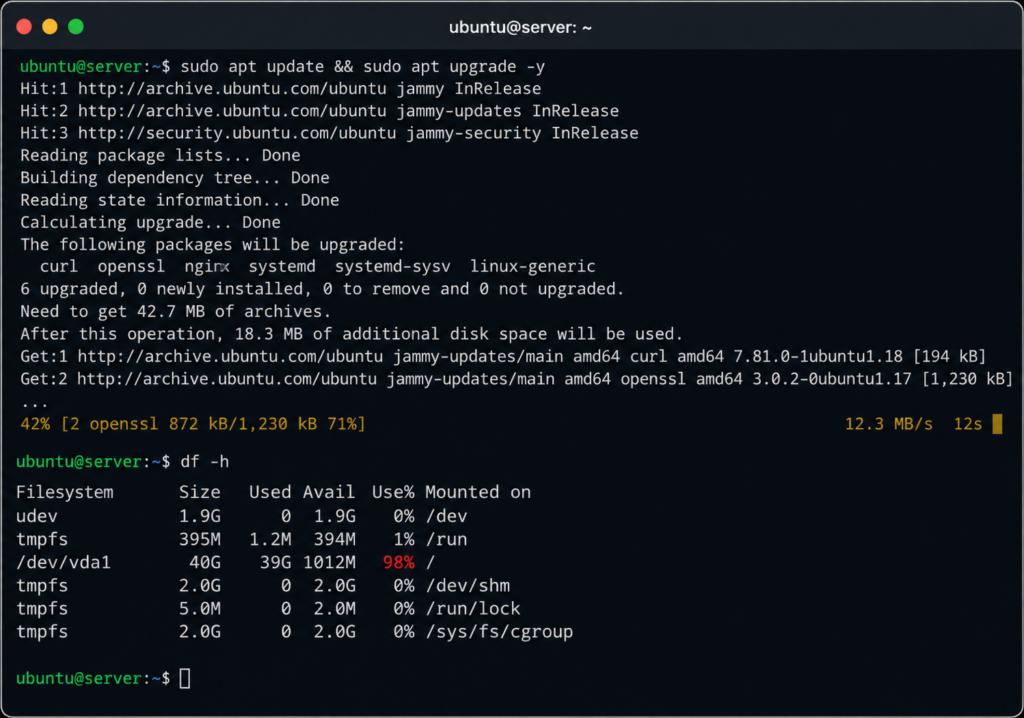
A terminal mid-maintenance: apt upgrade running, or a Certbot renewal, or df showing a disk near full.
And here’s the honest part most sales pages won’t say: none of that is hard, exactly. It’s just relentless, and it competes for the same hours you’d rather spend shipping. If you enjoy it, that’s a genuine perk of unmanaged, not a downside. If you don’t, it’s a slow leak.
What managed hosting takes off your plate
Managed flips every purple box in that diagram to the platform. On Kloudbean specifically, you still pick the raw cloud (DigitalOcean, Vultr, Linode, AWS, AWS Lightsail, Google Cloud, or UpCloud), so you’re on tier-1 infrastructure. The difference is the layer on top. You launch a server and it comes up hardened, with a Shorewall firewall and Fail2ban already running, free SSL ready to issue, and automatic backups turned on.

Then you deploy your app by pointing at it, not by hand-configuring Nginx and a systemd unit at midnight.

The backups run on a schedule (do go test a restore before you need one, that’s the step everybody skips, and there’s a walkthrough in the server backups guide). Your database sits on a private network rather than out on the public internet where scanners live. When you want to ship changes, you wire up Git auto-deploy and push. That gap between “bare Linux” and “running app served over HTTPS” is the thing you’re paying for. It’s a different product that happens to sit on the same hardware, not a markup on the same one.
IaaS, PaaS, and the managed middle
You’ll bump into these two acronyms, and they map cleanly onto this whole discussion:
- IaaS (Infrastructure as a Service) is the raw layer. Unmanaged VMs from DigitalOcean, Vultr, Linode, or AWS EC2. You get infrastructure and you operate it.
- PaaS (Platform as a Service) is the far end. You hand over code and the platform runs it, abstracting the server away almost entirely. Convenient, until you need to see what’s actually happening or move somewhere else.
Managed hosting sits in the middle, and that middle is where most teams are happiest. You still get a real server you can log into, unlike a pure PaaS black box, but the platform operates it for you, unlike raw IaaS. Control and visibility without signing up to be a full-time sysadmin.
The cost the pricing page doesn’t show
Back to that price gap. The difference between a five-dollar VPS and a managed plan isn’t hardware. It’s your time, plus risk. On the unmanaged box you personally do the setup, the patching, the renewals, the backups, and the incident response. Put a number on your hour, multiply by the hours those jobs actually take across a year, and the cheap server stops looking cheap. Add the tail risk (one botched upgrade or one missing backup can cost you data, which is the expensive kind of mistake) and the math shifts further.
💻 Unmanaged VPS
☁️ Managed Hosting
✓ Free SSL
✓ Firewall
✓ Automatic Backups
✓ Monitoring
✓ Deploy & Ship Code
It’s $8 + every hour you spend maintaining the server versus one predictable monthly price so you can spend that time building your product.
A back-of-envelope sum: the cheap VPS sticker plus your hourly rate times ops hours, set next to one flat managed price.
Managed hosting is, in plain terms, buying those hours and that risk back. We ran the full breakdown in the real cost of an unmanaged VPS, and the short version is that “cheap” and “expensive” swap places once your time is on the ledger. If your hours are better spent building, managed wins on real cost even while it loses on sticker. If the fiddling is the point, unmanaged wins. Both can be true.
When unmanaged is genuinely the right call
Let me be fair here, because unmanaged gets unfairly dunked on. It’s the correct choice in real situations, and not just for hobbyists.
Go unmanaged when you have the ops skill and you want the control: a custom kernel, an unusual stack, a specific tuning profile, something a managed layer would get in the way of. Go unmanaged when you’re learning Linux on purpose and the hands-on part is the whole point. Go unmanaged for a throwaway box, a lab, a thing where a wipe costs you nothing. In all of those, the lowest sticker price and total root-level control are exactly what you want, and paying for management would just be paying someone to not do a job you’d happily do yourself. No argument from me.
When to go managed
Go managed when the server is a means, not the goal. When you’re shipping a product and every hour on patching is an hour not on features. When “who fixes it at 2am” needs an answer that isn’t only you. When you’re perfectly capable of running the box but have decided your attention is worth more elsewhere, which, for the record, is the choice a lot of strong engineers quietly make. Managed isn’t the beginner option. It’s often the experienced one, made by people who know exactly how much work they’re handing off.
Three honest questions settle most cases. Is administering servers a good use of your time? Do you want the pager when it breaks on a weekend? Are you shipping, or learning the craft? Shipping and time-poor leans managed. Learning and control-hungry leans unmanaged. There’s no universal right answer, only the one that fits your situation, and the point is to choose it on purpose rather than on the sticker.
One boundary, whichever way you lean: this is the Linux world, not Windows or .NET and IIS stacks. With managed hosting the server, stack, SSL, and backups are handled for you, and your app and its data stay yours to export any day. You outsource the operations, never the ownership. That’s a good trade for most people running something that matters.
FAQ
What’s the difference between managed and unmanaged hosting?
Unmanaged hosting gives you a raw server and leaves all the operations to you: stack setup, patching, SSL, firewall, backups, and monitoring. Managed hosting runs that work for you on the same kind of server, so you interact with your application instead of the operating system. The price gap reflects that labor and risk, not the hardware.
Is a cheap DigitalOcean, Vultr, or Linode server unmanaged?
Yes. Basic instances from DigitalOcean, Vultr, and Linode are unmanaged infrastructure (IaaS). They’re excellent raw servers at a low price, with all operating and maintenance work left to you. That’s the model, and it’s exactly why they’re inexpensive. A managed platform can run on top of those same clouds and take the operations over.
Is managed hosting worth the extra cost?
It’s worth it when your time is better spent building than administering servers. The higher price buys back the hours you’d otherwise spend on setup, patching, SSL, backups, and incident response, plus the risk of a bad upgrade or a missing backup. If you enjoy or want that work, unmanaged is cheaper. If you don’t, managed usually wins on real cost.
What does “managed” actually include?
Typically the operating system, the stack (web server, runtime, database), OS and security patching, SSL issuance and renewal, firewall and intrusion blocking, automatic backups, and health monitoring. On Kloudbean that means a Shorewall firewall and Fail2ban on by default, free SSL, and automatic backups from launch. Your app code and data stay yours.
What is IaaS vs PaaS, and where does managed hosting fit?
IaaS is raw infrastructure you operate yourself (unmanaged VMs). PaaS abstracts the server away entirely and just runs your code. Managed hosting sits between them: a real server you can log into and reason about, but operated for you. You get the control of infrastructure with most of the convenience of a platform.
Do I need to know Linux to use managed hosting?
No. Managed hosting handles the Linux administration, so you don’t need those skills to run a production app. Plenty of people who do know Linux still choose managed to save time. It’s a decision about where to spend your attention, not a measure of ability.
Who fixes it when the server goes down at 2am?
On an unmanaged VPS, you do. It’s your box, your pager, your night. On managed hosting the platform handles the infrastructure side (the server, the stack, the patching that prevents a lot of those incidents in the first place), so a bad night doesn’t automatically become your bad night.
Can I move from an unmanaged VPS to managed hosting without rebuilding?
Usually yes. Your app and its data are standard and portable, so moving to managed hosting is a migration, not a rewrite. You bring the code, restore or import the data, and repoint your domain. Kloudbean also offers free migration assistance if you’d rather not run the move yourself.
Does managed hosting mean I lose root access and control?
You keep control of what matters: your application, your data, your deploys, and your configuration. Managed hosting takes over the operations underneath, which is the point. If you specifically need deep, unusual control over the OS or a custom kernel, that’s one of the real cases where unmanaged is the better fit.
Kloudbean · Own the app, skip the pager.