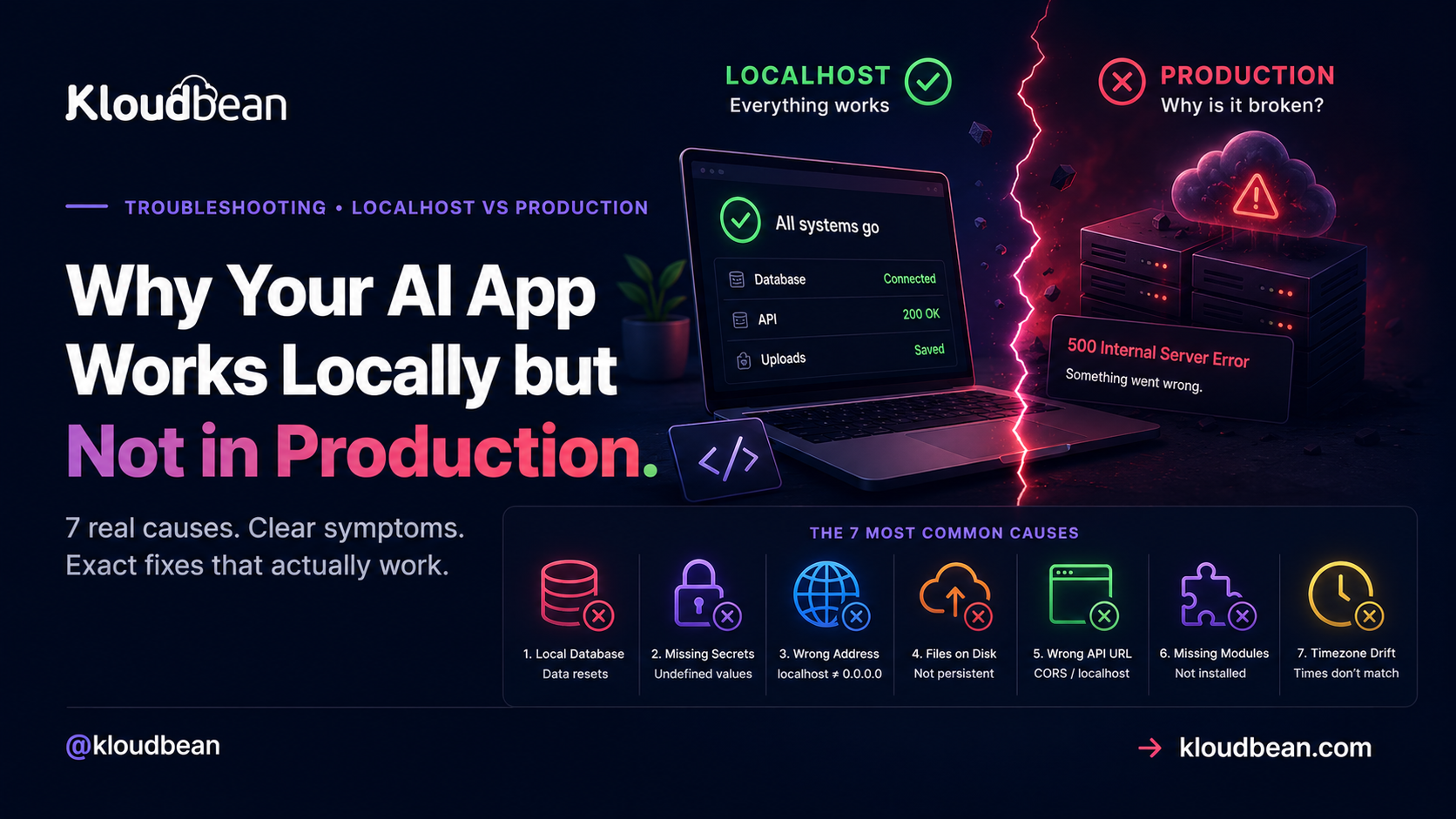
You built an app with Cursor, Lovable, Bolt, Replit, or v0. On your laptop it’s flawless. Buttons work, data saves, the thing feels finished. Then you deploy and the wheels come off: blank screens, a 500, data that quietly vanishes. If your AI app works locally but not in production, that’s not a punishment for bad code. You’ve hit the oldest gap in software, the one where it works on localhost, not in production. This guide walks the seven real causes. Each one gets the exact symptom, the reason, and the fix.
Why does an AI-built app work locally but break in production? Because production is a different environment, and the things your laptop quietly faked are now gone. The database was a local file that resets on redeploy. Your secrets lived in a .env that never reached the server. Your app listens on localhost instead of 0.0.0.0. It’s almost always config and state, not your logic. Fix the environment and the same code that ran locally runs in production.
Why your AI app works locally but not in production
Here’s the founder-level truth, and it saves a lot of thrashing. AI tools optimize for one thing: getting something running on your machine, fast. But “runs on my machine” leans on conveniences your laptop hands you for free and a real server does not. Your database is a file sitting right there. Secrets are in a .env the app just reads. Everything talks over localhost, uploads land on the same disk as your code, and the runtime is whatever you happen to have installed.
Production strips all of that away. The server is a fresh Linux box that knows none of your local assumptions. So the bug is rarely in the logic the AI wrote. It’s in the environment around it: config and state. See production-only failures that way and they stop being mysterious. Let’s walk the seven.
First move: open the Logs Viewer, not your editor
Before you change a line of code, read what the app said on its way down. On Kloudbean you can view your application logs directly from the UI: open Application Administration, then Logs Viewer. The logs are split into tabs. Web Requests Logs holds the web server access logs that record every request served by your app. App Info holds your app’s informational output (app.info.log). App Errors holds its error output (app.error.log), and that’s the tab that explains a crash or a 503. Start there.
There’s a search box in the viewer, which matters more than it sounds. Filter for ECONNREFUSED, EADDRINUSE, or the name of the module it says it cannot find, instead of scrolling through a wall of requests. Build and deploy output is separate: it streams live while a deploy runs and stays in Build and Deployment History, so a failed install or build step is still on the record afterwards.
Prefer files? The same two logs sit at /home/admin/hosted-sites/<app_system_user>/app-logs, as app.info.log for information and app.error.log for errors, and you can open them from the File Manager. Same content, longer route. One documented shortcut worth memorising: if the site answers with a 503, the application isn’t running, so the app error log is where the reason is written.
The seven usual culprits, most common first
These are the failures that turn “it worked five minutes ago” into a deployed app that won’t load. I’ve ordered them by how often they bite. Scan the table, find the symptom on your screen, jump to the fix.
| Symptom you see | Real cause | The fix |
|---|---|---|
| Data resets after a redeploy; empty tables | Local SQLite or file database | Move to a managed Postgres or MySQL |
Crash on boot, values are undefined | Secrets never set on the server | Set env vars in Runtime Configuration |
| 502 or 503, blank wall | App bound to localhost, not the port | Listen on 0.0.0.0 and process.env.PORT |
| Uploaded files 404 later | Uploads written to local disk | Store files in object storage |
CORS error, calls to localhost fail | Frontend points at a local API URL | Use an env-driven base URL |
Cannot find module, blank page | No build step, or dev-only deps dropped | Set the build command; fix dependencies |
| Install fails, modern syntax errors | Node or Python version mismatch | Pin the runtime version |
1. Your database was a local file, and production wiped it
Symptom: you sign up a test user, everything’s fine. Then you push a change, the app redeploys, and every account is gone. Or you see SQLITE_ERROR: no such table where there was clearly a table yesterday.
Cause: the AI generated your app against SQLite or a local file, because that needs zero setup and works the instant you run it. Great for building. But a lot of production filesystems are ephemeral, so a redeploy or restart hands you a clean disk, and your database file goes with it. SQLite is great in dev and wrong the moment a second person relies on the app.
Fix: run a real database that lives on its own and survives deploys. Point your app at a managed Postgres or MySQL through a DATABASE_URL, and swap the local file out:
# Local (works, then wipes on the next redeploy)
DATABASE_URL="file:./dev.db"

# Production: a managed database that persists
DATABASE_URL="postgresql://appuser:[email protected]:5432/appdb"
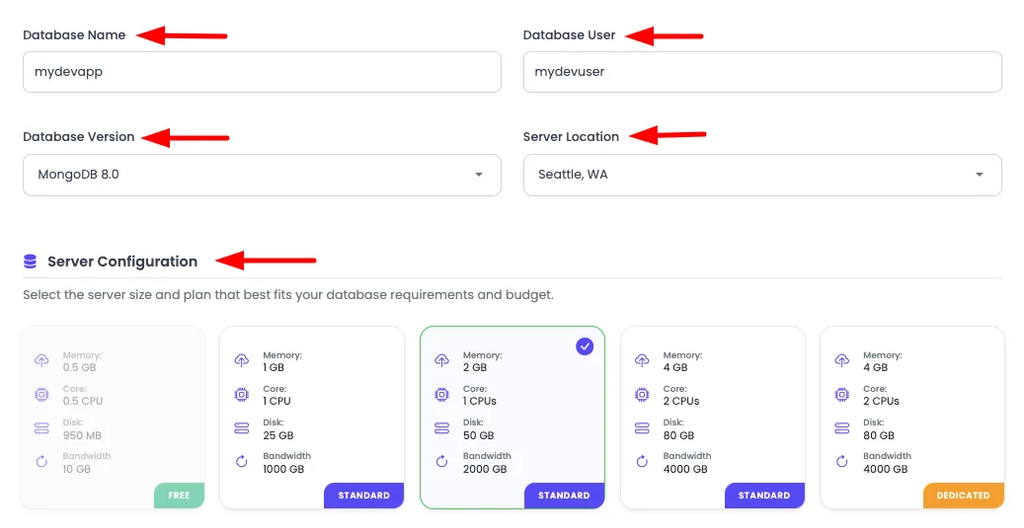
On Kloudbean you open DBS, click Launch Database, and wire the connection in as an environment variable. The full walkthrough, with migration commands for Prisma, Drizzle, Django, Laravel, and Rails, is in how to add a managed database to your app. Do this before you have real users, not after you lose them.
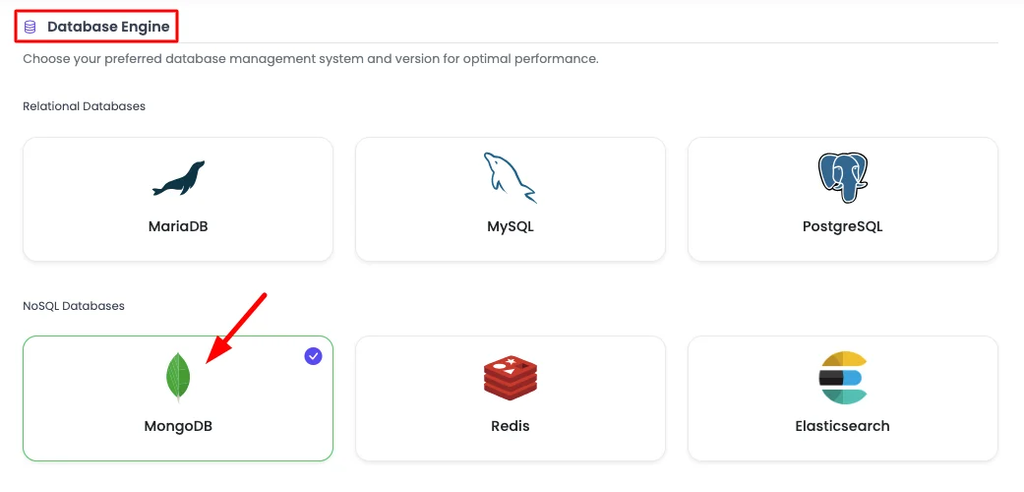
DBS, then Launch Database. A managed Postgres or MySQL persists across every deploy, unlike a local file.
2. Your secrets live on your laptop, not on the server
Symptom: the app boots, then dies instantly. Logs show a value is undefined, or you get Error: connect ECONNREFUSED 127.0.0.1:5432, or an API client throws because a key is empty. Works locally every single time.
Cause: your .env file is in .gitignore, which is correct. But that also means it never travels to the server. The app reaches for DATABASE_URL or OPENAI_API_KEY, finds nothing, and crashes. This is the single thing we see break most often on a first deploy, and there’s not one line of bad code involved.
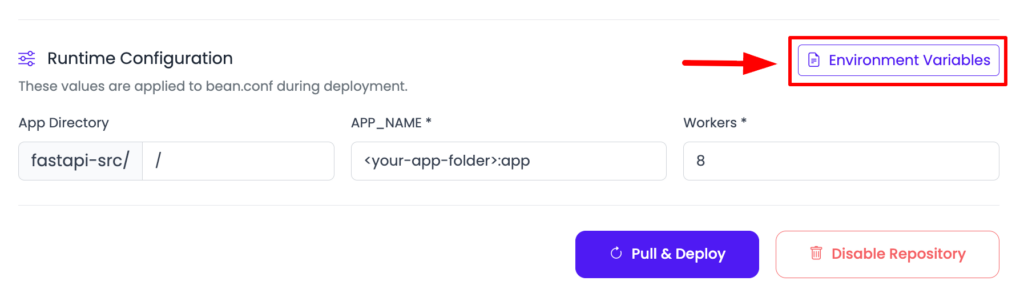
Fix: set every secret on the server itself. In Kloudbean that’s Runtime Configuration → Environment Variables, where you can paste your whole .env and convert it to key/value in one go, then redeploy. The reliable habit is env parity: put your local .env and the server’s variables side by side and set anything that’s missing. New to this? Read environment variables done right before you trust any deploy. And don’t paste secrets into the repo to make the deploy pass. That leaks your keys into Git history forever.
3. Your app binds to localhost, so nothing can reach it
Symptom: a green build, then a 502 Bad Gateway or 503 Service Unavailable when you open the URL. The logs even say the app is listening. Dead page anyway.
Cause: either the app hard-codes a port like 3000 instead of reading the one the platform assigned, or it binds to 127.0.0.1 (localhost) instead of 0.0.0.0. Bound to localhost, the app is only reachable from inside itself. The web server out front knocks, gets no answer, and returns a 502 or 503. This is the most common production-only failure that isn’t about data.
If the distinction between a loopback address and a bind address is new, what 127.0.0.1 actually means covers it properly, including why 0.0.0.0 is an instruction rather than a destination.
Fix: read the assigned port from the environment and bind to every interface.
// Breaks in production: only the box itself can reach this
app.listen(3000, '127.0.0.1')

// Works: bind to all interfaces on the port you're given
const port = process.env.PORT || 3000
app.listen(port, '0.0.0.0', () => console.log('up on ' + port))
Python is the same idea:
# Flask
app.run(host="0.0.0.0", port=int(os.environ.get("PORT", 8000)))

# FastAPI with uvicorn
uvicorn main:app --host 0.0.0.0 --port $PORT
The || 3000 fallback keeps it working on your laptop while doing the right thing in production. This failure is common enough to have its own field guide: how to fix a 503 after deploying your app walks the full decision tree.
4. File uploads write to local disk, then disappear
Symptom: a user uploads an avatar or a PDF, it shows up fine, and after the next deploy the image is a broken link. Logs show ENOENT: no such file or directory pointing at an /uploads path.
Cause: the app saves uploaded files to the local disk next to the code, usually through something like multer’s disk storage. Same trap as the local database. That disk isn’t permanent, and it isn’t shared if you ever run more than one instance. Redeploy, and the files are gone.
Fix: write uploads to object storage instead of the app’s disk. It’s built for this: durable, separate from your app, reachable by every instance. Kloudbean has built-in S3-compatible buckets with full AWS S3 SDK compatibility, so most existing upload code works with a config change rather than a rewrite. The S3-compatible object storage guide shows how to point uploads at a bucket.
5. Your frontend still points at localhost (the CORS wall)
Symptom: the deployed site loads, but nothing fetches. The browser console reads Access to fetch at 'http://localhost:3001/api' from origin 'https://yourapp.com' has been blocked by CORS policy. Or every API call just fails silently.
Cause: the frontend has a hard-coded API base URL of http://localhost:3001. On your laptop the backend really is at localhost, so it works. In production the visitor’s browser tries to reach their own localhost, finds nothing, and the request dies. The CORS error is the same root problem from the server side: your API only allows requests from localhost.
Fix: never hard-code the API location. Drive it from an environment variable, and fall back to a relative path so same-origin calls just work:
// Vite / React
const API = import.meta.env.VITE_API_URL || '/api'
fetch(API + '/users')
Then set VITE_API_URL at build time in production, and set your API’s allowed CORS origin to your real domain instead of localhost. Note that frontend build variables are baked in when the app is built, so they have to be present during the build, not just at runtime.
6. The build step never ran, or dev-only dependencies vanished
Symptom: a blank white page, 404s on your JavaScript and CSS, or a hard crash with Cannot find module 'vite' or sh: vite: command not found during deploy.
Cause: two flavors. First, no build command was set, so the server serves raw source that was never compiled into dist or build. Second, the build tool (Vite, the TypeScript compiler) sits in devDependencies, and a production install with NODE_ENV=production skips those. It builds on your laptop because you installed everything. It fails on the server because the server was told to be lean.
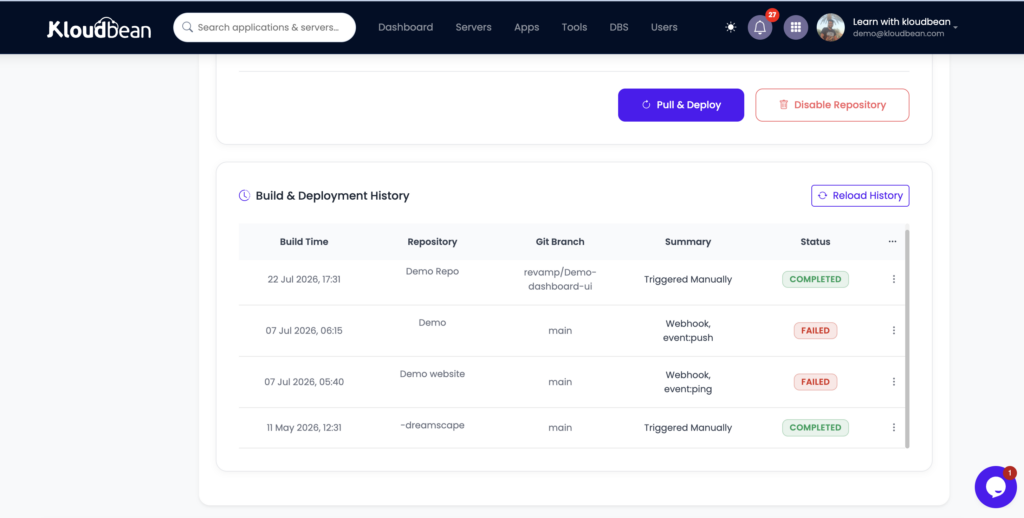
Fix: set the build command explicitly (usually npm run build) so the production assets actually get generated. If a package is needed to build, make sure it’s installed at build time rather than pruned. On Kloudbean you set the install, build, and start commands right in the Git deployment config, and the live build logs show you exactly which step failed.
7. Node or Python version mismatch
Symptom: packages fail to install, or the app throws syntax errors on code that’s obviously valid, or you see The engine "node" is incompatible with this module. Expected version ">=20". Got "18.17.0".
Cause: your laptop runs one version and the server defaulted to another. Modern syntax and newer packages assume a recent runtime, so an older server chokes on things that ran fine for you. It’s the least common cause here, but it produces the most confusing errors, because the code genuinely is correct.
Fix: pin the version so both environments match. For Node, declare it in package.json and set the same version in your runtime config:
{
  "engines": { "node": ">=20" }
}
For Python, pin the interpreter version in the app’s runtime settings. Kloudbean lets you set the Node or Python version in the UI, so you match your local runtime without touching the server by hand. Pin it once and this class of bug disappears.
Is it my code or my config? Almost always config
Notice the pattern across all seven. Not one is a bug in the logic the AI wrote. Every one is about the environment: where data lives, where secrets come from, what address the app answers on, where files go, and which runtime runs them. That’s the mental model. When something works locally and breaks deployed, suspect config and state first, and open your application code last.
The trap I see most is editing app code to chase a bug that was never in the code. You make the working parts worse while the real cause, a missing variable or a local path, sits untouched. Read the logs, check the environment, and resist rewriting what already ran.
A pre-flight checklist before you push
Once you’ve been burned once, a short habit keeps the next deploy boring:
- The database is a managed Postgres or MySQL, not a local file, and
DATABASE_URLis set on the server. - Every key in your local
.envis also set in the server’s environment variables. - The app binds to
0.0.0.0and readsprocess.env.PORT, never a hard-coded port. - File uploads go to object storage, not the local disk.
- The frontend’s API URL comes from an env var, and CORS allows your real domain.
- The build command is set, and everything needed to build is installed at build time.
- The runtime version is pinned to match what you develop on.
- You ran the production build locally once. If it fails on your machine, it’ll fail on the server.
None of that is heavy process. It turns “deploy and pray” into “deploy and know.”
Why one dashboard makes this gap smaller
Most of these failures share a root: the app needs services and config that live somewhere other than your laptop, and stitching them across three or four providers is where things slip through. That’s the part Kloudbean removes. Your managed database, environment variables, object storage, and build logs sit in one dashboard, on a server you own, in one account. You set the port and env vars in the UI, launch the database next to the app, and watch the build stream live. Fewer moving pieces, fewer places for a localhost assumption to hide.
Weighing where to put a vibe-coded app after a hobby host? The Render alternative for vibe-coded apps breaks down the tradeoffs, and the pillar guide, how to deploy an AI-built app to production, ties every step together.
The code already runs. Now give it a real home.
Launch a managed server, database, and object storage from one dashboard at kloudbean.com, with a free trial and your first migration done for you. Sizes and plans on pricing.
Managed databases · Environment variables in the UI · Object storage · Live build logs · Free migration
FAQ
Why does my AI-built app work locally but not in production?
Because production is a different environment and the conveniences your laptop provided are gone. The database was a local file, the secrets were in a .env that never reached the server, and the app assumed localhost. It’s almost always config and state, not the code the AI wrote. Fix the environment and the same code runs.
My app works on localhost but not when deployed. What do I check first?
Read the logs before touching code. On Kloudbean that’s Application Administration then Logs Viewer, where the App Errors tab holds app.error.log, and build failures stay in Build and Deployment History. The log almost always names the exact problem, whether it’s a missing environment variable, a port it cannot bind, or a module it cannot find. Guessing wastes the most time.
Why did all my data disappear after I redeployed?
Your app is using SQLite or a local file database on an ephemeral filesystem. When the app redeploys, the disk is reset and the data goes with it. Move to a managed Postgres or MySQL that lives independently and survives deploys, then wire it in through a DATABASE_URL environment variable.
Why do I get ECONNREFUSED 127.0.0.1 in production?
The app is trying to reach a database or service at localhost that only existed on your machine. In production that address points at the server itself, where nothing is listening. Set the real connection details as environment variables on the server and point the app at the managed service.
Why does my app return a 502 or 503 after deploying?
The app process is not answering on the port the platform expects. Usually it binds to localhost or a hard-coded port instead of 0.0.0.0 and process.env.PORT, or it crashed on startup over a missing variable. Bind correctly, set the env vars, and redeploy.
Why do my uploaded files disappear on the server?
They were written to the local disk, which is not permanent and is not shared across instances. A redeploy or restart wipes them. Store uploads in object storage instead, which is durable and reachable by every instance of your app.
Why am I getting a CORS error only in production?
Your frontend has a hard-coded API URL pointing at localhost, or your API only allows requests from localhost. Drive the API base URL from an environment variable, fall back to a relative path, and set the allowed CORS origin to your real production domain.
Cannot find module in production but it works locally. Why?
The package is either missing from your real dependencies or it was in devDependencies and got pruned by a production install. It worked locally because you had everything installed. Make anything the app or the build needs a proper dependency, and confirm the build command actually ran.
Can a Node or Python version mismatch cause production-only bugs?
Yes. If the server runs an older runtime than your laptop, modern syntax and newer packages can fail with confusing errors even though the code is correct. Pin the version in package.json engines for Node, or in the runtime settings for Python, and match it in your host’s config.
By Kloudbean Engineering · Field notes from the gap between localhost and production.